This is part of series Building a homelab, where I document my journey to build my own homelab with Kubernetes.
- Creating a Kubernetes cluster with Talos Linux
- Setting up Argo CD
Introduction
I have previously stated at the end of my post about Talos Linux that the next step was to migrate existing services to my Kubernetes cluster. I currently have two of them in operation, which are Ente Photos and PeerTube.
With how (somewhat) effortless installing Helm charts with Terraform/OpenTofu was, I initially considered using the infrastructure-as-code tool to deploy just about everything. However, I then realised that:
- not everything is packaged as Helm charts
- if the Kubernetes provider is used as an alternative to Helm, applying some manifests with Terraform/OpenTofu can be problematic, especially if the resource in question is a
CustomResourceDefinition(CRD) object
The reason for the latter is that the kubernetes_manifest resource from the Kubernetes provider requires the cluster to be already set up prior to planning.
This resource requires API access during planning time. This means the cluster has to be accessible at plan time and thus cannot be created in the same apply operation. We recommend only using this resource for custom resources or resources not yet fully supported by the provider.
With Talos Linux being set up during the application, it was not going to be the case. Since I was likely better off choosing a better fit for the Kubernetes ecosystem anyway, I decided to set up a well-known “continuous delivery tool for Kubernetes”: Argo CD.
Maintaining the system
Before starting with the deployment, though, I had a few things to do to get the cluster ready.
Hardware: the coin-cell battery
The laptop that is running the cluster has its main battery disconnected, which was done to prevent wear.
Upon losing power, though, it was no longer able to retain modifications to firmware settings. It was a problem, as I had to set “SATA Operation” to AHCI (from RAID), which would be reverted when a power interruption happens.
To prevent the system from losing its settings, I decided to replace its coin-cell battery. The service manual I have previously used for disconnecting the display was opened again as a reference.
First, I shut down the system using talosctl.
[lyuk98@framework:~]$ nix shell nixpkgs#talosctl

[lyuk98@framework:~]$ talosctl shutdown
I then removed the device’s cover, like I have previously done.
First, I removed eight screws from the bottom of the laptop.
The flap in the middle was then opened, and a screw hidden underneath was removed.
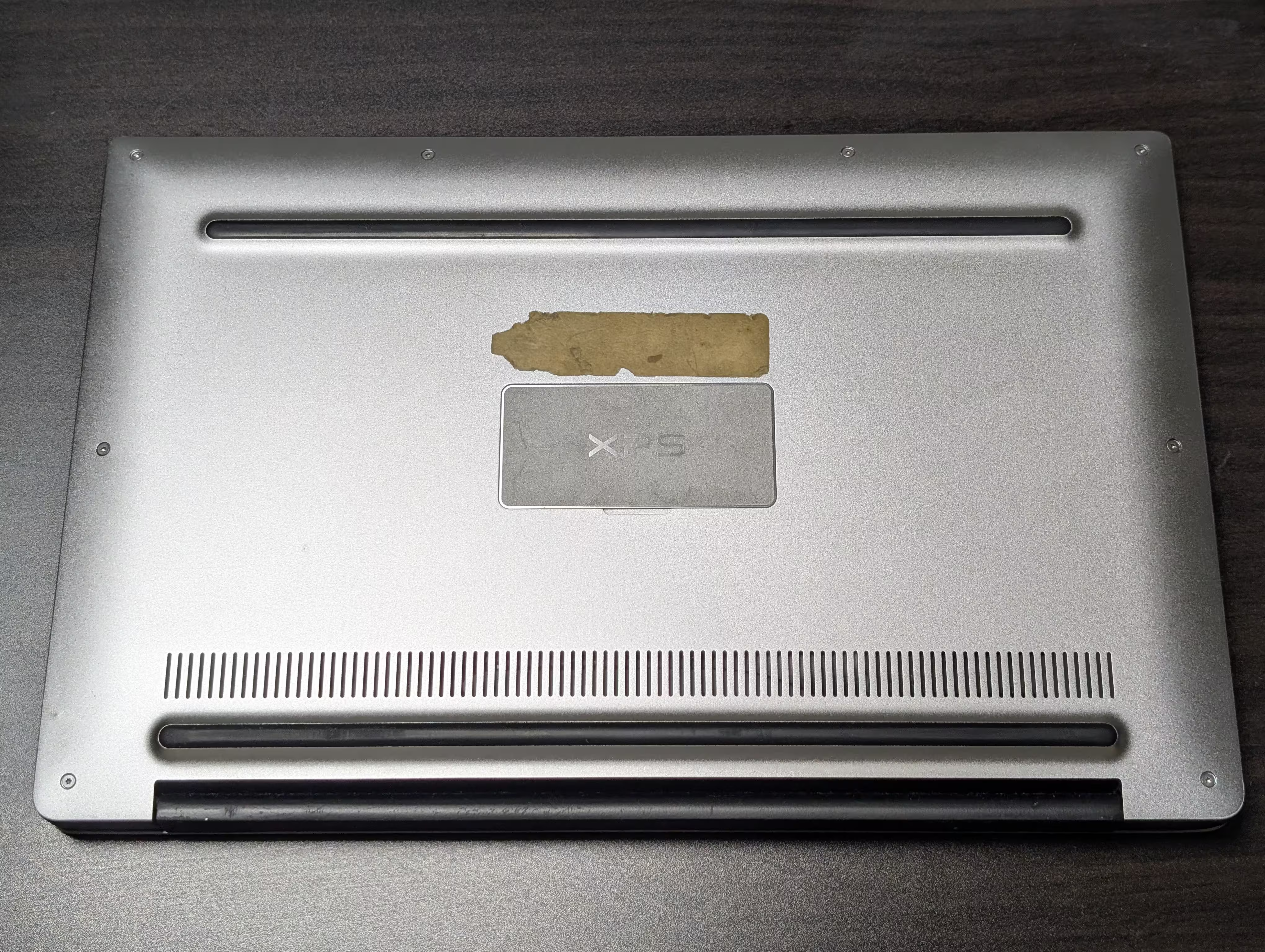

Once it was open, I could see the RTC battery sitting beside the primary battery pack.

It was an ML1220 rechargeable coin-cell battery. I peeled off what was wrapping up the cell and saw thin contacts seemingly soldered into the battery.

A replacement battery was to be purchased. The problem, however, was that it would take at least a few weeks for proper battery replacements (with connectors to connect to the motherboard with) to be delivered. As a result, while waiting for one, I experimented with just the cell, which arrived just a day after making an order.
The old cell was then separated from the connector.

I initially considered soldering the new one next, but later felt that it is not a good idea to expose a cell to a lot of heat. Because of that, it was just wrapped with some electrical tape while making contacts.

When the system was powered on, though, it disappointingly failed to start. Its diagnostic indicator, which blinked three times in amber and once in white, indicated a “CMOS battery failure”.
I later realised that connecting the main battery allows the system to be usable again. With a possibility that the previous coin-cell battery only needed to be charged (and not outright be replaced), I started thinking that all the steps I have taken so far may have been for nothing.
I know about that now, at least. With the device running even without the RTC battery, I decided to continue in this state.
Software: upgrading Talos Linux and Kubernetes
Since when I deployed my cluster, newer versions of both Talos Linux and Kubernetes were made available. Before making more modifications to the cluster, I decided to update the environment.
At the time I was working on this part, the newest version of Talos Linux was v1.12.6. As upgrading the cluster using Terraform/OpenTofu is still not possible, some manual steps were to be involved.
I first went to my repository for OpenTofu configurations. From there, I went through pretty much the same steps as the last time.
Before initialisation, I prepared environment variables for
tofuto use.[lyuk98@framework:~/opentofu-kubernetes]$ nix-shell --pure [nix-shell:~/opentofu-kubernetes]$ source ~/env.shThe
env.shI wrote contained declarations of the following environment variables:
AWS_SECRET_ACCESS_KEY: the application key from Backblaze B2 to access the bucket withAWS_ACCESS_KEY_ID: the ID of the abovementioned application keyAWS_ENDPOINT_URL_S3: Backblaze B2’s S3 API endpointCLOUDFLARE_API_TOKEN: the API token for Cloudflare operationsTAILSCALE_OAUTH_CLIENT_SECRET: the OAuth credential used for deploymentTAILSCALE_OAUTH_CLIENT_ID: the ID of the abovementioned OAuth credentialOn top of the above, the file also had input variables set as environment variables:
TF_VAR_state_passphrase: the passphrase used for encrypting and decrypting state and plan dataTF_VAR_cloudflare_zone_id: Cloudflare zone IDTF_VAR_node_xps13: address of the node; the only possible option, with the node in maintenance mode, was the internal IP address of my home network (such as192.168.0.2).I then prepared another file
backend.tfvarswith just one line of backend configuration: the bucket name.[nix-shell:~/opentofu-kubernetes]$ cat backend.tfvars bucket = "opentofu-state-kubernetes"
One thing I did differently this time was that I did not set TF_VAR_node_xps13. It defaults to the hostname, which Tailscale’s MagicDNS automatically resolves to the device’s tailnet IP address.
I ran tofu init, while adding -upgrade to get latest versions of providers.
[nix-shell:~/opentofu-kubernetes]$ tofu init -backend-config=backend.tfvars -upgrade
Then, at variables.tf, new versions were specified.
 variable "talos_version" {
   type        = string
   description = "Version of Talos Linux"
-  default     = "v1.12.4"
+  default     = "v1.12.6"
   nullable    = false
 }

 variable "kubernetes_version" {
   type        = string
   description = "Version of Kubernetes to use with Talos Linux"
-  default     = "v1.35.1"
+  default     = "v1.35.3"
   nullable    = false
 }
The changes were applied next, by running tofu plan and tofu apply.
[nix-shell:~/opentofu-kubernetes]$ tofu plan -out=tfplan

[nix-shell:~/opentofu-kubernetes]$ tofu apply tfplan
When it was done, I was surprised to see that Kubernetes was already updated. Talos Linux, on the other hand, was expectedly still in its previous version.
[lyuk98@framework:~]$ nix shell nixpkgs#kubectl nixpkgs#talosctl

[lyuk98@framework:~]$ kubectl version
Client Version: v1.35.3
Kustomize Version: v5.7.1
Server Version: v1.35.3

[lyuk98@framework:~]$ talosctl version
Client:
	Tag:         v1.12.6
	SHA:         undefined
	Built:
	Go version:  go1.26.1
	OS/Arch:     linux/amd64
Server:
	NODE:        xps13
	Tag:         v1.12.4
	SHA:         fc8e600b
	Built:
	Go version:  go1.25.7
	OS/Arch:     linux/amd64
	Enabled:     RBAC
Rebooting the node did not do anything, so I queried the OpenTofu state to see new Image Factory URLs.
[nix-shell:~/opentofu-kubernetes]$ tofu state show data.talos_image_factory_urls.xps13
# data.talos_image_factory_urls.xps13:
data "talos_image_factory_urls" "xps13" {
    architecture  = "amd64"
    platform      = "metal"
    schematic_id  = "19bad511ec610d3ce5fe680fd34334e45621f0e90c7b2f621998647e7f5f5ef9"
    talos_version = "v1.12.6"
    urls          = {
        disk_image            = "https://factory.talos.dev/image/19bad511ec610d3ce5fe680fd34334e45621f0e90c7b2f621998647e7f5f5ef9/v1.12.6/metal-amd64.raw.zst"
        disk_image_secureboot = "https://factory.talos.dev/image/19bad511ec610d3ce5fe680fd34334e45621f0e90c7b2f621998647e7f5f5ef9/v1.12.6/metal-amd64-secureboot.raw.zst"
        initramfs             = "https://factory.talos.dev/image/19bad511ec610d3ce5fe680fd34334e45621f0e90c7b2f621998647e7f5f5ef9/v1.12.6/initramfs-amd64.xz"
        installer             = "factory.talos.dev/metal-installer/19bad511ec610d3ce5fe680fd34334e45621f0e90c7b2f621998647e7f5f5ef9:v1.12.6"
        installer_secureboot  = "factory.talos.dev/metal-installer-secureboot/19bad511ec610d3ce5fe680fd34334e45621f0e90c7b2f621998647e7f5f5ef9:v1.12.6"
        iso                   = "https://factory.talos.dev/image/19bad511ec610d3ce5fe680fd34334e45621f0e90c7b2f621998647e7f5f5ef9/v1.12.6/metal-amd64.iso"
        iso_secureboot        = "https://factory.talos.dev/image/19bad511ec610d3ce5fe680fd34334e45621f0e90c7b2f621998647e7f5f5ef9/v1.12.6/metal-amd64-secureboot.iso"
        kernel                = "https://factory.talos.dev/image/19bad511ec610d3ce5fe680fd34334e45621f0e90c7b2f621998647e7f5f5ef9/v1.12.6/kernel-amd64"
        kernel_command_line   = "https://factory.talos.dev/image/19bad511ec610d3ce5fe680fd34334e45621f0e90c7b2f621998647e7f5f5ef9/v1.12.6/cmdline-metal-amd64"
        pxe                   = "https://pxe.factory.talos.dev/pxe/19bad511ec610d3ce5fe680fd34334e45621f0e90c7b2f621998647e7f5f5ef9/v1.12.6/metal-amd64"
        uki                   = "https://factory.talos.dev/image/19bad511ec610d3ce5fe680fd34334e45621f0e90c7b2f621998647e7f5f5ef9/v1.12.6/metal-amd64-secureboot-uki.efi"
    }
}
The installer_secureboot was the one for me to use. With it, the upgrade was performed using talosctl upgrade.
[lyuk98@framework:~]$ talosctl upgrade \
  --image factory.talos.dev/metal-installer-secureboot/19bad511ec610d3ce5fe680fd34334e45621f0e90c7b2f621998647e7f5f5ef9:v1.12.6 \
  --nodes xps13 \
  --stage
After a long wait, the node was rebooted to finish the upgrade process.
[lyuk98@framework:~]$ talosctl reboot
With the cluster now up to date, I moved on to actual deployments.
[lyuk98@framework:~]$ talosctl version
Client:
	Tag:         v1.12.6
	SHA:         undefined
	Built:
	Go version:  go1.26.1
	OS/Arch:     linux/amd64
Server:
	NODE:        xps13
	Tag:         v1.12.6
	SHA:         a1b8bd61
	Built:
	Go version:  go1.25.8
	OS/Arch:     linux/amd64
	Enabled:     RBAC
The plan
Tailscale network with support for custom domains and HTTPS
I wanted to make Argo CD accessible by web browsers, while blocking access from the rest of the internet by exposing it only over the tailnet. Tailscale allows users to do just that, where the easiest solution was to annotate an existing Service. It could have almost worked for me, but I unfortunately wanted one more thing: using a custom domain to access the service.
I initially tried to solve this in three steps:
- Deploy Helm chart for Argo CD with aforementioned annotation trick
- Wait for the service to appear in the tailnet
- Let OpenTofu create DNS records with the service’s tailnet IP addresses
However, this meant that I will have to access the service via plain HTTP, like what I am currently doing with Vault. Although I am aware that network traffic between Tailscale nodes are encrypted, I thought it would be a plus to make web browsers stop complaining about insecure connections. As a result, I decided to manually expose the service, while additionally deploying cert-manager to issue HTTPS certificates.
In favour of Gateway API
A common way to expose a Service to an external network seemed to be using Ingress. However, I noticed that Kubernetes no longer recommends its use.
The Kubernetes project recommends using Gateway instead of Ingress. The Ingress API has been frozen.
This means that:
- The Ingress API is generally available, and is subject to the stability guarantees for generally available APIs. The Kubernetes project has no plans to remove Ingress from Kubernetes.
- The Ingress API is no longer being developed, and will have no further changes or updates made to it.
With Ingress Nginx already retired, and its repository archived, I did not want my cluster to have a known dependency to a retiring technology right from the beginning. Despite the relative lack of documentation, I decided to adopt Gateway API, choosing Cilium as its implementation (because it is already present in the cluster).
Managing DNS records from Kubernetes
While searching for resources on using Gateway API, I found a documentation from Tailscale that does almost exactly what I wanted. A difference, though, was that I intended to use Cilium instead of Envoy as the Gateway API implementation (although I believe the former does use the latter in some capacity).
The aforementioned documentation also mentioned ExternalDNS, which would automatically create DNS records. I felt it was much more reliable than letting OpenTofu do so, eventually also deciding to deploy this service as a result.
Using Argo CD to deploy Argo CD (in some way)
At first, I very much wanted to deploy everything as Helm charts, due to their seemingly less maintenance burden. Some resources (like ClusterIssuer), however, were not automatically created by them. Even worse, using Helm to deploy those additional resources, such as by setting the chart’s extraObjects value for cert-manager, was not very reliable; in some cases, user-specified manifests were attempted to be installed before CRDs for them were even available.
Eventually, I planned to create Argo CD’s Application resources that are synchronised with a repository that contains additional manifests. To deploy them before the service is properly set up, I chose argocd-apps from a collection of community-maintained Argo Helm charts.
Charts for services themselves (including Cilium, Tailscale Kubernetes Operator, cert-manager, ExternalDNS, and Argo CD) were to be installed in the same way as before, using the helm_release resource. For other resources, a set of Application objects was to handle their deployments.
Talos Linux + Cilium + Tailscale + Gateway API + cert-manager + ExternalDNS
At this point, I have not seen anyone attempt to deploy Argo CD with this combination of services. I was somewhat excited to be one of the few (if not the only one) to document doing so, but at the same time, it meant that resources I find online have to be modified to fit my needs. It is not like I am usually complacent with solutions I think could be improved, though.
It was not supposed to be this complicated…
Writing configurations
A little bit of refactoring
I started by moving all provider declarations, like the following block for Helm, to main.tf.
# Helm package manager
provider "helm" {
  kubernetes = {
    host = local.cluster_endpoint

    client_certificate     = base64decode(talos_cluster_kubeconfig.kubernetes.kubernetes_client_configuration.client_certificate)
    client_key             = base64decode(talos_cluster_kubeconfig.kubernetes.kubernetes_client_configuration.client_key)
    cluster_ca_certificate = base64decode(talos_cluster_kubeconfig.kubernetes.kubernetes_client_configuration.ca_certificate)
  }
}
Versions for Helm charts were then specified as variables, which would help make changes to them without editing the code.
variable "cilium_version" {
  type        = string
  description = "Version of the Helm chart for Cilium"
  default     = "1.19.2"
  nullable    = false
}

variable "tailscale_operator_version" {
  type        = string
  description = "Version of the Helm chart for Tailscale Operator"
  default     = "1.96.5"
  nullable    = false
}
helm.tf was deleted and charts declared there were moved. helm_release.cilium was moved to cilium.tf, and helm_release.tailscale_operator was moved to tailscale.tf.
Node-specific Tailscale resources were then moved to talos-xps13.tf.
# OAuth client for node (XPS 13)
resource "tailscale_oauth_client" "xps13" {
  scopes      = ["auth_keys"]
  description = local.hostnames.control_plane.xps13
  tags        = ["tag:k8s-control-plane", "tag:k8s-worker"]
}

# Tailnet device information (XPS 13)
data "tailscale_device" "xps13" {
  depends_on = [talos_machine_configuration_apply.xps13]
  hostname   = local.hostnames.control_plane.xps13
  wait_for   = "10m"
}
Lastly, Namespace for Tailscale was set to be managed by OpenTofu, instead of being created upon the Helm chart’s installation.
# Kubernetes Namespace (Tailscale)
resource "kubernetes_namespace_v1" "tailscale" {
  metadata {
    name = "tailscale"
    labels = {
      # Enforce "privileged" Pod Security Standards policy
      "pod-security.kubernetes.io/enforce" = "privileged"
    }
  }
}
The Pod Security Standards policy for resources in this Namespace was set to Privileged, as it is apparently required to avoid problems in setting up Tailscale’s load balancer that will be used for Gateway API configuration later.
Gateway API
As mentioned earlier, Cilium was my choice of Gateway API implementation. Their documentation listed a few prerequisites for enabling the feature, which I followed next.
The kube-proxy replacement
- Cilium must be configured with the kube-proxy replacement, using
kubeProxyReplacement=true. For more information, see kube-proxy replacement.
Adding one additional object to set was apparently enough.
# Helm chart (Cilium)
resource "helm_release" "cilium" {
  # ...

  set = [
    # ...
    # Configure the kube-proxy replacement
    {
      name  = "kubeProxyReplacement"
      value = true
    },
    # ...
  ]

  # ...
}
However, I then remembered that Talos Linux had an option to disable kube-proxy, which I added next.
locals {
  # Patches for control plane nodes
  talos_patches_controlplane = {
    # ...

    # Disable kube-proxy
    disable_proxy = {
      cluster = {
        proxy = {
          disabled = true
        }
      }
    }

    # ...
  }
}
Gateway API CRDs
- The below CRDs from Gateway API v1.4.1
mustbe pre-installed. Please refer to this docs for installation steps. Alternatively, the below snippet could be used.
From what I understood, this meant that the CRDs must exist before Cilium; I had to find a way to somehow install them with OpenTofu.
Although I could not find an official Helm chart for the resources, their repository had a Kustomization resource, which could be used to install them with the Kustomize provider.
I first added a variable to declare the version of Gateway API CRDs to use. The latest version at the time of writing is v1.5.1, but given that Cilium specifically requires v1.4.1 and that v1.5 does not properly work with the implementation, I could not choose the newer version.
variable "gateway_api_version" {
  type        = string
  description = "Version of Gateway API CRDs"
  default     = "v1.4.1"
  nullable    = false
}
(It was a pain to roll back from v1.5 to v1.4, as a validating admission policy was introduced in the newer version to prevent downgrades.)
The provider was then set up by adding it to the required_providers block and declaring a provider block.
terraform {
  # ...

  required_providers {
    # ...
    kustomization = {
      source  = "kbst/kustomization"
      version = "~> 0.9.7"
    }
    # ...
  }
}

# ...

# Kustomization provider
provider "kustomization" {
  kubeconfig_raw = talos_cluster_kubeconfig.kubernetes.kubeconfig_raw
}

# ...
Then, using the kustomization_build data source, manifests for the kustomization_resource resource to apply to the cluster were set to be generated.
# Kustomization - Gateway API CRDs
data "kustomization_build" "gateway_api" {
  path = "github.com/kubernetes-sigs/gateway-api/config/crd?ref=${urlencode(var.gateway_api_version)}"
}
It would download the Kustomization resource over Git and build the manifest. Because this operation needs Git itself as well as public Certificate Authorities (CA) to communicate over HTTPS, corresponding packages were added to default.nix for the nix-shell environment.
{
  pkgs ? import <nixpkgs> { },
  ...
}:
{
  # The default development environment
  default = pkgs.mkShellNoCC {
    nativeBuildInputs = with pkgs; [
      cacert # for fetching from Git over HTTPS
      git
      opentofu
      python3
    ];
  };
}
The manifests were then set to be applied to the cluster. Because some resources apparently need to be applied before the others, I followed the provider’s example to apply them sequentially based on their priorities.
# Gateway API CRDs - priority 0
resource "kustomization_resource" "gateway_api_p0" {
  for_each = data.kustomization_build.gateway_api.ids_prio[0]
  manifest = data.kustomization_build.gateway_api.manifests[each.value]
}
# Gateway API CRDs - priority 1
resource "kustomization_resource" "gateway_api_p1" {
  depends_on = [kustomization_resource.gateway_api_p0]
  for_each   = data.kustomization_build.gateway_api.ids_prio[1]
  manifest   = data.kustomization_build.gateway_api.manifests[each.value]
}
# Gateway API CRDs - priority 2
resource "kustomization_resource" "gateway_api_p2" {
  depends_on = [kustomization_resource.gateway_api_p1]
  for_each   = data.kustomization_build.gateway_api.ids_prio[2]
  manifest   = data.kustomization_build.gateway_api.manifests[each.value]
}
Modifying Cilium
After the prerequisites were dealt with, the chart resource for Cilium was edited to depends_on the Gateway API resources. Some additional values were specified as well, which include Envoy-related configurations that I would later need for using Tailscale’s load balancer.
# Helm chart (Cilium)
resource "helm_release" "cilium" {
  depends_on = [kustomization_resource.gateway_api_p2]

  chart      = "cilium"
  name       = "cilium"
  repository = "https://helm.cilium.io/"

  atomic          = true
  cleanup_on_fail = true
  namespace       = "kube-system"

  upgrade_install = true
  version         = var.cilium_version

  set = [
    # ...
    # Enable Cilium's Gateway API implementation
    {
      name  = "gatewayAPI.enabled"
      value = true
    },
    # Enable dedicated Envoy proxy DaemonSet
    {
      name  = "envoy.enabled"
      value = true
    },
    # Enable CiliumEnvoyConfig CRD
    {
      name  = "envoyConfig.enabled"
      value = true
    }
  ]

  # ...
}
cert-manager and ExternalDNS
Creating Namespace
First, new Namespace objects were set to be created by OpenTofu.
# Kubernetes Namespace (cert-manager)
resource "kubernetes_namespace_v1" "cert_manager" {
  metadata {
    name = "cert-manager"
  }
}

# Kubernetes Namespace (ExternalDNS)
resource "kubernetes_namespace_v1" "external_dns" {
  metadata {
    name = "external-dns"
  }
}
Creating Secret
The Secret resources containing the Cloudflare API token, for cert-manager to perform DNS-01 challenges (because HTTP-01 challenges are not possible for services over the tailnet) and for ExternalDNS to modify DNS records, were next. I could not figure out how either cert-manager or ExternalDNS can refer to a Secret from a different Namespace, so I used a for_each argument for the resource to be applied in two separate places.
# Secret containing Cloudflare API Token
resource "kubernetes_secret_v1" "cloudflare_api_token" {
  depends_on = [
    kubernetes_namespace_v1.cert_manager,
    kubernetes_namespace_v1.external_dns
  ]

  # Deploy to each Namespace
  for_each = toset(["cert-manager", "external-dns"])

  metadata {
    name      = "cloudflare-api-token"
    namespace = each.value
  }

  immutable = true
  type      = "Opaque"

  data = {
    api-token = var.cloudflare_api_token
  }
}
I decided to store the same Cloudflare API token that OpenTofu itself uses, because creating one from the infrastructure-as-code tool seemed a bit complicated. A new variable to accept the existing token was first created.
variable "cloudflare_api_token" {
  type        = string
  description = "API token for Cloudflare operations"
  sensitive   = true
  nullable    = false
}
The Cloudflare provider was then configured to use the variable for its API token instead.
# Cloudflare resource management
provider "cloudflare" {
  api_token = var.cloudflare_api_token
}
Installing Helm charts
Like before, versions of services’ charts were declared as variables.
variable "cert_manager_version" {
  type        = string
  description = "Version of the Helm chart for cert-manager"
  default     = "1.20.2"
  nullable    = false
}

variable "external_dns_version" {
  type        = string
  description = "Version of the Helm chart for ExternalDNS"
  default     = "1.20.0"
  nullable    = false
}
The chart for cert-manager was first set to be installed.
# Helm chart (cert-manager)
resource "helm_release" "cert_manager" {
  depends_on = [
    kubernetes_namespace_v1.cert_manager,
    helm_release.cilium
  ]

  chart      = "cert-manager"
  name       = "cert-manager"
  repository = "https://charts.jetstack.io/"

  atomic          = true
  cleanup_on_fail = true
  namespace       = "cert-manager"

  upgrade_install = true
  version         = var.cert_manager_version

  values = [
    yamlencode({
      crds = {
        enabled = true
      }
      config = {
        enableGatewayAPI = true
      }
    })
  ]
}
The chart for ExternalDNS was next. Some supplied values indicated:
- Cloudflare is to be used as the DNS provider
- the API token is going to be provided by the previously defined
Secret - ExternalDNS will only affect my domain’s records
- only the resources that set the label
external-dns: enabledwill be set up - on top of the defaults (
ServiceandIngress), ExternalDNS will also watchHTTPRouteandGRPCRouteresources from Gateway API
# Helm chart (ExternalDNS)
resource "helm_release" "external_dns" {
  depends_on = [
    kubernetes_secret_v1.cloudflare_api_token["external-dns"],
    helm_release.cilium
  ]

  chart      = "external-dns"
  name       = "external-dns"
  repository = "https://kubernetes-sigs.github.io/external-dns/"

  atomic          = true
  cleanup_on_fail = true
  namespace       = "external-dns"

  upgrade_install = true
  version         = var.external_dns_version

  values = [
    yamlencode({
      provider = {
        # Use Cloudflare as the DNS provider
        name = "cloudflare"
      }

      env = [
        # Cloudflare API token
        {
          name = "CF_API_TOKEN"
          valueFrom = {
            secretKeyRef = {
              name = "cloudflare-api-token"
              key  = "api-token"
            }
          }
        }
      ]

      # Limit target zone to personal domain
      domainFilters = [
        data.cloudflare_zone.default.name
      ]

      # Only watch resources with the following label
      labelFilter = "external-dns==enabled"

      # Query Gateway API resources for endpoints
      sources = [
        "service",
        "ingress",
        "gateway-httproute",
        "gateway-grpcroute"
      ]
    })
  ]

  timeout = 600
}
Argo CD
Setting up the chart
A variable, a Namespace, and a chart were defined first.
variable "argocd_version" {
  type        = string
  description = "Version of the Helm chart for Argo CD"
  default     = "9.5.0"
  nullable    = false
}

# Kubernetes Namespace (Argo CD)
resource "kubernetes_namespace_v1" "argocd" {
  metadata {
    name = "argocd"
  }
}

# Helm chart (Argo CD)
resource "helm_release" "argocd" {
  depends_on = [
    kubernetes_namespace_v1.argocd,
    helm_release.cilium
  ]

  chart      = "argo-cd"
  name       = "argo-cd"
  repository = "https://argoproj.github.io/argo-helm"

  atomic          = true
  cleanup_on_fail = true
  namespace       = "argocd"

  upgrade_install = true
  version         = var.argocd_version

  values = [
    yamlencode({
      # Set domain for all components
      global = {
        domain = "argo-cd.tailnet.${data.cloudflare_zone.default.name}"
      }
      configs = {
        params = {
          # Run API server with TLS disabled for SSL termination
          "server.insecure" = true
        }
      }
    })
  ]
}
Since my main objective was to encrypt the traffic between the user and the cluster (and not the one within), TLS termination was to be set up. As such, Argo CD’s API server had its own TLS settings disabled.

File:SSL termination proxy.svg by User:Galgalesh is licensed under CC BY-SA 4.0
New repository and Kustomization
I created a new repository at GitHub to separately store manifests. From there, I wrote three Kustomization resources with the following directory structure:
[lyuk98@framework:~]$ nix shell nixpkgs#tree

[lyuk98@framework:~]$ tree ~/argocd-kubernetes/
/home/lyuk98/argocd-kubernetes/
├── argocd
│   ├── argocd-grpc-route.yaml
│   ├── argocd-http-route.yaml
│   └── kustomization.yaml
├── cert-manager
│   ├── kustomization.yaml
│   ├── letsencrypt-staging.yaml
│   └── letsencrypt.yaml
├── README.md
└── tailscale
    ├── gateway-class-tailscale.yaml
    ├── gateway-config-tailscale.yaml
    ├── gateway-tailscale.yaml
    └── kustomization.yaml

4 directories, 11 files
The reason why I did not implement the app of apps pattern is because I wanted to keep Application resources within the OpenTofu configuration; it felt like the easiest way to patch Kustomization resources with sensitive infrastructure details.
Kustomization: cert-manager
Pretty much the only significant thing kustomization.yaml was there for was letting Argo CD include other manifests.
apiVersion: kustomize.config.k8s.io/v1beta1
kind: Kustomization

metadata:
  name: kustomize-cert-manager
  namespace: cert-manager

resources:
  - letsencrypt-staging.yaml
  - letsencrypt.yaml
Cluster-wide issuer objects using DNS-01 challenges were then defined, where letsencrypt-staging.yaml uses the staging environment from Let’s Encrypt.
letsencrypt-staging.yaml |
letsencrypt.yaml |
|---|---|
|
|
The email (spec.acme.email) was set to blank, which OpenTofu will later patch. Aside from that, the shortlived profile was to be used for issuing certificates; just 160 hours of validity period was not an issue to me, since everything was going to be automated anyway.
Kustomization: Tailscale
Just like earlier, kustomization.yaml included other manifests as resources.
apiVersion: kustomize.config.k8s.io/v1beta1
kind: Kustomization

metadata:
  name: kustomize-tailscale
  namespace: tailscale

resources:
  - gateway-class-tailscale.yaml
  - gateway-config-tailscale.yaml
  - gateway-tailscale.yaml
To perform the equivalent of configuring EnvoyProxy (to use tailscale as its load balancer) with Cilium instead, a CiliumGatewayClassConfig resource was created.
# Gateway configuration, using Tailscale as a LoadBalancer provider
apiVersion: cilium.io/v2alpha1
kind: CiliumGatewayClassConfig

metadata:
  name: tailscale
  namespace: tailscale

spec:
  service:
    type: LoadBalancer
    loadBalancerClass: tailscale
The GatewayClass resource, that refers to the Gateway configuration that was just created, was defined next.
# GatewayClass configuration
apiVersion: gateway.networking.k8s.io/v1
kind: GatewayClass

metadata:
  name: tailscale
  namespace: tailscale

spec:
  controllerName: io.cilium/gateway-controller
  parametersRef:
    group: cilium.io
    kind: CiliumGatewayClassConfig
    name: tailscale
    namespace: tailscale
Lastly, a Gateway was defined. As far as I could tell, this resource was meant to handle traffic for all tailnet-only services.
# Tailscale Gateway specification
apiVersion: gateway.networking.k8s.io/v1
kind: Gateway

metadata:
  name: tailscale
  namespace: tailscale
  labels:
    external-dns: enabled
  annotations:
    cert-manager.io/cluster-issuer: letsencrypt

spec:
  gatewayClassName: tailscale
  listeners:
    - name: https
      protocol: HTTPS
      port: 443
      hostname: ""
      allowedRoutes:
        namespaces:
          from: All
      tls:
        mode: Terminate
        certificateRefs:
          - name: tailnet-certificate
The label was set to what ExternalDNS expects, and the annotation for cert-manager was set to use the production environment from Let’s Encrypt.
The hostname this Gateway will listen to was not explicitly specified, but it was later to be patched by OpenTofu to contain a wildcard (like *.tailnet.[custom-domain]). This was because I was worried about hitting rate limits from Let’s Encrypt after issuing too many certificates for all the potential services that will be served over the tailnet.
Kustomization: Argo CD
For Argo CD, two resources that kustomization.yaml includes are HTTPRoute and GRPCRoute that Argo CD wrote about in their documentation.
argocd-http-route.yaml |
argocd-grpc-route.yaml |
|---|---|
|
|
The routes were set to use the Tailscale Gateway. The hostnames properties were later to be filled by OpenTofu.
AppProject and Application
As mentioned earlier, to create an initial set of Argo CD resources, the argocd-apps Helm chart was to be used. First, the version of the said chart was defined as a variable.
variable "argocd_apps_version" {
  type        = string
  description = "Version of the argocd-apps Helm chart"
  default     = "2.0.4"
  nullable    = false
}
A new project, that will be home to future Application resources, was first defined within the chart installation declaration. It was restricted to only allow creation of resources under expected conditions.
# Helm chart (AppProject - Argo CD)
resource "helm_release" "argocd_project" {
  depends_on = [
    kubernetes_namespace_v1.cert_manager,
    kubernetes_namespace_v1.tailscale,
    helm_release.argocd
  ]

  chart      = "argocd-apps"
  name       = "argocd-project-kubernetes"
  repository = "https://argoproj.github.io/argo-helm"

  atomic          = true
  cleanup_on_fail = true
  namespace       = "argocd"

  upgrade_install = true
  version         = var.argocd_apps_version

  values = [
    yamlencode({
      projects = {
        # AppProject containing applications necessary for proper cluster operation
        argocd-project-kubernetes = {
          namespace   = "argocd"
          description = "Project for cluster's operation"

          # Only allow repository for this project
          sourceRepos = [
            "https://github.com/lyuk98/argocd-kubernetes"
          ]

          destinations = [
            # Allow deployments to namespace "argocd"
            {
              namespace = "argocd"
              name      = "in-cluster"
            },
            # Allow deployments to namespace "cert-manager"
            {
              namespace = "cert-manager"
              name      = "in-cluster"
            },
            # Allow deployments to namespace "tailscale"
            {
              namespace = "tailscale"
              name      = "in-cluster"
            }
          ]

          # List of CustomResourceDefinitions to allow for bootstrapping
          clusterResourceWhitelist = [
            for kind in [
              "CiliumGatewayClassConfig",
              "ClusterIssuer",
              "Gateway",
              "GatewayClass",
              "GRPCRoute",
              "HTTPRoute"
              ] : {
              group = "*"
              kind  = kind
            }
          ]
        }
      }
    })
  ]
}
The Application resources were next.
Application: cert-manager
The resource was first defined at cert-manager.tf.
# Helm chart (Argo CD Application - cert-manager)
resource "helm_release" "argocd_cert_manager" {
  depends_on = [
    helm_release.argocd_project,
    kubernetes_secret_v1.cloudflare_api_token
  ]

  chart      = "argocd-apps"
  name       = "argocd-application-cert-manager"
  repository = "https://argoproj.github.io/argo-helm"

  atomic          = true
  cleanup_on_fail = true
  namespace       = "argocd"

  upgrade_install = true
  version         = var.argocd_apps_version

  values = [
    yamlencode({
      applications = {
        # Argo CD configuration
        argocd-application-cert-manager = {
          namespace  = "argocd"
          finalizers = ["resources-finalizer.argocd.argoproj.io"]
          project    = "argocd-project-kubernetes"

          # ClusterIssuer configuration
          source = {
            path           = "cert-manager"
            repoURL        = "https://github.com/lyuk98/argocd-kubernetes"
            targetRevision = "main"
            kustomize = {
              patches = [
                {
                  target = {
                    kind = "ClusterIssuer"
                    name = "letsencrypt-staging"
                  }
                  patch = yamlencode([
                    {
                      op    = "replace"
                      path  = "/spec/acme/email"
                      value = var.acme_email
                    }
                  ])
                },
                {
                  target = {
                    kind = "ClusterIssuer"
                    name = "letsencrypt"
                  }
                  patch = yamlencode([
                    {
                      op    = "replace"
                      path  = "/spec/acme/email"
                      value = var.acme_email
                    }
                  ])
                }
              ]
            }
          }
          destination = {
            name      = "in-cluster"
            namespace = "cert-manager"
          }

          syncPolicy = {
            automated = {
              selfHeal = true
            }
          }
        }
      }
    })
  ]
}
The variable acme_email was separately defined afterwards.
variable "acme_email" {
  type        = string
  description = "Email for ACME ClusterIssuer configuration"
  sensitive   = true
  nullable    = false
}
Application: Tailscale
Following cert-manager, Argo CD Application for Tailscale was defined at tailscale.tf.
# Helm chart (Argo CD application - Tailscale Kubernetes Operator)
resource "helm_release" "argocd_tailscale" {
  depends_on = [
    helm_release.argocd_cert_manager,
    helm_release.tailscale_operator,
    helm_release.external_dns
  ]

  chart      = "argocd-apps"
  name       = "argocd-application-tailscale"
  repository = "https://argoproj.github.io/argo-helm"

  atomic          = true
  cleanup_on_fail = true
  namespace       = "argocd"

  upgrade_install = true
  version         = var.argocd_apps_version

  values = [
    yamlencode({
      applications = {
        # Argo CD configuration
        argocd-application-tailscale = {
          namespace  = "argocd"
          finalizers = ["resources-finalizer.argocd.argoproj.io"]
          project    = "argocd-project-kubernetes"

          # Tailscale Gateway configuration
          source = {
            path           = "tailscale"
            repoURL        = "https://github.com/lyuk98/argocd-kubernetes"
            targetRevision = "main"
            kustomize = {
              patches = [
                {
                  target = {
                    kind = "Gateway"
                    name = "tailscale"
                  }
                  patch = yamlencode([
                    {
                      op    = "replace"
                      path  = "/spec/listeners/0/hostname"
                      value = "*.tailnet.${data.cloudflare_zone.default.name}"
                    }
                  ])
                }
              ]
            }
          }
          destination = {
            name      = "in-cluster"
            namespace = "tailscale"
          }

          syncPolicy = {
            automated = {
              selfHeal = true
            }
          }
        }
      }
    })
  ]
}
Application: Argo CD
Lastly, the Application for creating routes to Argo CD was defined at argocd.tf.
# Helm chart (Argo CD Application - Argo CD)
resource "helm_release" "argocd_application" {
  depends_on = [helm_release.argocd_tailscale]

  chart      = "argocd-apps"
  name       = "argocd-application"
  repository = "https://argoproj.github.io/argo-helm"

  atomic          = true
  cleanup_on_fail = true
  namespace       = "argocd"

  upgrade_install = true
  version         = var.argocd_apps_version

  values = [
    yamlencode({
      applications = {
        # Argo CD configuration
        argocd-application = {
          namespace  = "argocd"
          finalizers = ["resources-finalizer.argocd.argoproj.io"]
          project    = "argocd-project-kubernetes"
          source = {
            path           = "argocd"
            repoURL        = "https://github.com/lyuk98/argocd-kubernetes"
            targetRevision = "main"
            kustomize = {
              # Add custom domain to Kustomization
              patches = [
                {
                  target = {
                    kind = "HTTPRoute"
                    name = "argocd-http-route"
                  }
                  patch = yamlencode([
                    {
                      op    = "add"
                      path  = "/spec/hostnames/0"
                      value = local.argocd_domain
                    }
                  ])
                },
                {
                  target = {
                    kind = "GRPCRoute"
                    name = "argocd-grpc-route"
                  }
                  patch = yamlencode([
                    {
                      op    = "add"
                      path  = "/spec/hostnames/0"
                      value = local.argocd_domain
                    }
                  ])
                }
              ]
            }
          }
          destination = {
            name      = "in-cluster"
            namespace = "argocd"
          }

          syncPolicy = {
            automated = {
              selfHeal = true
            }
          }
        }
      }
    })
  ]
}
Applying the new configuration
With the configuration ready, I started preparing for the resource application. New providers were introduced since the last change, so I ran tofu init again.
[nix-shell:~/opentofu-kubernetes]$ source ~/env.sh

[nix-shell:~/opentofu-kubernetes]$ tofu init -backend-config=backend.tfvars
The env.sh was made earlier, while upgrading the cluster, but now had a few differences:
CLOUDFLARE_API_TOKENwas replaced withTF_VAR_cloudflare_api_token, containing the same API token.TF_VAR_acme_emailwas added.
When it was done, tofu plan and tofu apply were all there were left to run.
[nix-shell:~/opentofu-kubernetes]$ tofu plan -out=tfplan

[nix-shell:~/opentofu-kubernetes]$ tofu apply tfplan
Accessing Argo CD
A while after the changes were applied, I noticed new DNS records and, consequently, I could now access Argo CD’s web interface using my custom domain.
I was locked behind a login page, however. To get authenticated, I accessed the administrator account’s initial password.
[lyuk98@framework:~]$ kubectl get --output=jsonpath="{.data.password}" secret argocd-initial-admin-secret --namespace argocd | base64 --decode
With the password, I then logged in to the service.

Applications in the cluster, which were created by OpenTofu, were now visible.

Conclusion
Just like the last time, I wrote another visual representation for the OpenTofu-managed resources.
  flowchart RL
  %% Resource/data source declaration

  %% argocd.tf
  kubernetes_namespace_v1.argocd
  helm_release.argocd
  helm_release.argocd_project
  helm_release.argocd_application

  %% cert-manager.tf
  kubernetes_namespace_v1.cert_manager
  helm_release.cert_manager
  helm_release.argocd_cert_manager

  %% cilium.tf
  data.kustomization_build.gateway_api([data.kustomization_build.gateway_api])
  kustomization_resource.gateway_api_p0
  kustomization_resource.gateway_api_p1
  kustomization_resource.gateway_api_p2
  helm_release.cilium

  %% cloudflare.tf
  data.cloudflare_zone.default([data.cloudflare_zone.default])
  time_sleep.dns_ready
  terraform_data.dns_ready
  cloudflare_dns_record.xps13_a
  cloudflare_dns_record.xps13_aaaa

  %% external-dns.tf
  kubernetes_namespace_v1.external_dns
  kubernetes_secret_v1.cloudflare_api_token
  helm_release.external_dns

  %% tailscale.tf
  kubernetes_namespace_v1.tailscale
  helm_release.tailscale_operator
  helm_release.argocd_tailscale
  tailscale_oauth_client.kubernetes_operator

  %% talos-controlplane.tf
  data.talos_machine_configuration.controlplane([data.talos_machine_configuration.controlplane])

  %% talos-xps13.tf
  talos_machine_configuration_apply.xps13
  talos_machine_bootstrap.xps13
  random_password.talos_encryption_passphrase_xps13
  talos_image_factory_schematic.xps13
  data.talos_image_factory_urls.xps13([data.talos_image_factory_urls.xps13])
  tailscale_oauth_client.xps13
  data.tailscale_device.xps13([data.tailscale_device.xps13])

  %% talos.tf
  talos_machine_secrets.kubernetes
  data.talos_client_configuration.kubernetes([data.talos_client_configuration.kubernetes])
  talos_cluster_kubeconfig.kubernetes
  local_sensitive_file.talosconfig
  local_sensitive_file.kubeconfig

  %% Relation declaration

  %% argocd.tf
  helm_release.argocd-- depends_on -->kubernetes_namespace_v1.argocd
  helm_release.argocd-- depends_on -->helm_release.cilium
  helm_release.argocd-- name -->data.cloudflare_zone.default
  helm_release.argocd_project-- depends_on -->kubernetes_namespace_v1.cert_manager
  helm_release.argocd_project-- depends_on -->kubernetes_namespace_v1.tailscale
  helm_release.argocd_project-- depends_on -->helm_release.argocd
  helm_release.argocd_application-- depends_on -->helm_release.argocd_tailscale
  helm_release.argocd_application-- name -->data.cloudflare_zone.default

  %% cert-manager.tf
  helm_release.cert_manager-- depends_on -->kubernetes_namespace_v1.cert_manager
  helm_release.cert_manager-- depends_on -->helm_release.cilium
  helm_release.argocd_cert_manager-- depends_on -->helm_release.argocd_project
  helm_release.argocd_cert_manager-- depends_on -->kubernetes_secret_v1.cloudflare_api_token

  %% cilium.tf
  kustomization_resource.gateway_api_p0-- ids_prio -->data.kustomization_build.gateway_api
  kustomization_resource.gateway_api_p1-- depends_on -->kustomization_resource.gateway_api_p0
  kustomization_resource.gateway_api_p1-- ids_prio -->data.kustomization_build.gateway_api
  kustomization_resource.gateway_api_p2-- depends_on -->kustomization_resource.gateway_api_p1
  kustomization_resource.gateway_api_p2-- ids_prio -->data.kustomization_build.gateway_api
  helm_release.cilium-- depends_on -->kustomization_resource.gateway_api_p2

  %% cloudflare.tf
  time_sleep.dns_ready-- content -->cloudflare_dns_record.xps13_a
  time_sleep.dns_ready-- content -->cloudflare_dns_record.xps13_aaaa
  terraform_data.dns_ready-- triggers_replace -->time_sleep.dns_ready
  terraform_data.dns_ready-- name -->data.cloudflare_zone.default
  terraform_data.dns_ready-- triggers -->time_sleep.dns_ready
  cloudflare_dns_record.xps13_a-- addresses -->data.tailscale_device.xps13
  cloudflare_dns_record.xps13_aaaa-- addresses -->data.tailscale_device.xps13

  %% external-dns.tf
  kubernetes_secret_v1.cloudflare_api_token-- depends_on -->kubernetes_namespace_v1.cert_manager
  kubernetes_secret_v1.cloudflare_api_token-- depends_on -->kubernetes_namespace_v1.external_dns
  helm_release.external_dns-- depends_on -->kubernetes_secret_v1.cloudflare_api_token
  helm_release.external_dns-- depends_on -->helm_release.cilium
  helm_release.external_dns-- name -->data.cloudflare_zone.default

  %% tailscale.tf
  helm_release.tailscale_operator-- depends_on -->kubernetes_namespace_v1.tailscale
  helm_release.tailscale_operator-- depends_on -->helm_release.cilium
  helm_release.tailscale_operator-- id -->tailscale_oauth_client.kubernetes_operator
  helm_release.tailscale_operator-- key -->tailscale_oauth_client.kubernetes_operator
  helm_release.argocd_tailscale-- depends_on -->helm_release.argocd_cert_manager
  helm_release.argocd_tailscale-- depends_on -->helm_release.tailscale_operator
  helm_release.argocd_tailscale-- depends_on -->helm_release.external_dns
  helm_release.argocd_tailscale-- name -->data.cloudflare_zone.default

  %% talos-controlplane.tf
  data.talos_machine_configuration.controlplane-- name -->data.cloudflare_zone.default
  data.talos_machine_configuration.controlplane-- machine_secrets -->talos_machine_secrets.kubernetes

  %% talos-xps13.tf
  talos_machine_configuration_apply.xps13-- client_configuration -->talos_machine_secrets.kubernetes
  talos_machine_configuration_apply.xps13-- machine_configuration -->data.talos_machine_configuration.controlplane
  talos_machine_configuration_apply.xps13-- urls -->data.talos_image_factory_urls.xps13
  talos_machine_configuration_apply.xps13-- key -->tailscale_oauth_client.xps13
  talos_machine_configuration_apply.xps13-- tags -->tailscale_oauth_client.xps13
  talos_machine_configuration_apply.xps13-- result -->random_password.talos_encryption_passphrase_xps13
  talos_machine_bootstrap.xps13-- depends_on -->data.tailscale_device.xps13
  talos_machine_bootstrap.xps13-- replace_triggered_by -->talos_machine_configuration_apply.xps13
  talos_machine_bootstrap.xps13-- client_configuration -->talos_machine_secrets.kubernetes
  data.talos_image_factory_urls.xps13-- id -->talos_image_factory_schematic.xps13
  tailscale_device.xps13-- depends_on -->talos_machine_configuration_apply.xps13

  %% talos.tf
  data.talos_client_configuration.kubernetes-- client_configuration -->talos_machine_secrets.kubernetes
  data.talos_client_configuration.kubernetes-- content -->cloudflare_dns_record.xps13_a
  talos_cluster_kubeconfig.kubernetes-- depends_on -->terraform_data.dns_ready
  talos_cluster_kubeconfig.kubernetes-- replace_triggered_by -->talos_machine_secrets.kubernetes
  talos_cluster_kubeconfig.kubernetes-- client_configuration -->talos_machine_secrets.kubernetes
  talos_cluster_kubeconfig.kubernetes-- content -->cloudflare_dns_record.xps13_a
  local_sensitive_file.talosconfig-- talos_config -->data.talos_client_configuration.kubernetes
  local_sensitive_file.kubeconfig-- kubeconfig_raw -->talos_cluster_kubeconfig.kubernetes
The graph became complex to the point where it essentially became incomprehensible. To understand the application flow better, I read the code and wrote what would be done in each step of tofu apply.
Step 1
- The following providers are set up:
provider "cloudflare"provider "local"provider "random"provider "tailscale"provider "talos"provider "time"
Step 2
data.cloudflare_zone.defaultretrieves information about the specified Cloudflare zonerandom_password.talos_encryption_passphrase_xps13generates storage encryption passphrase for XPS 13- OAuth clients from Tailscale are generated for Kubernetes operator as well as Talos Linux nodes:
tailscale_oauth_client.kubernetes_operatortailscale_oauth_client.xps13
talos_image_factory_schematic.xps13generates Image Factory schematic for XPS 13talos_machine_secrets.kubernetesgenerates machine secrets for the cluster
Step 3
data.talos_machine_configuration.controlplaneprepares machine configuration for control plane nodesdata.talos_image_factory_urls.xps13makes URLs for the Image Factory schematic (for XPS 13) available
Step 4
talos_machine_configuration_apply.xps13applies configuration to XPS 13, installing Talos Linux
Step 5
data.tailscale_device.xps13waits until the node connects to the tailnet, then retrieves its information
Step 6
- The following DNS records for the Talos Linux nodes are added:
cloudflare_dns_record.xps13_acloudflare_dns_record.xps13_aaaa
talos_machine_bootstrap.xps13bootstraps the etcd cluster
Step 7
time_sleep.dns_readywaits while DNS records propagatedata.talos_client_configuration.kubernetesgeneratestalosconfigthat can be used to access Talos Linux nodes viatalosctl
Step 8
terraform_data.dns_readychecks, and optionally waits, for DNS propagationlocal_sensitive_file.talosconfigwrites generatedtalosconfigto the local file system
Step 9
talos_cluster_kubeconfig.kubernetesgenerateskubeconfigfor accessing the Kubernetes cluster viakubectl
Step 10
- The following providers are set up using generated
kubeconfig:provider "helm"provider "kubernetes"provider "kustomization"
local_sensitive_file.kubeconfigwrites generatedkubeconfigto the local file system
Step 11
- Four Kubernetes
Namespaceresources are created:kubernetes_namespace_v1.argocdkubernetes_namespace_v1.cert_managerkubernetes_namespace_v1.external_dnskubernetes_namespace_v1.tailscale
data.kustomization_build.gateway_apibuilds manifest from aKustomizationfor Gateway API resources
Step 12
kustomization_resource.gateway_api_p0applies Gateway API resources withkindNamespaceandCustomResourceDefinitionkubernetes_secret_v1.cloudflare_api_tokencreates KubernetesSecretcontaining Cloudflare API token
Step 13
kustomization_resource.gateway_api_p1applies Gateway API resources withkindother thanNamespace,CustomResourceDefinition,MutatingWebhookConfiguration, andValidatingWebhookConfiguration
Step 14
kustomization_resource.gateway_api_p2applies remaining Gateway API resources
Step 15
helm_release.ciliuminstalls Helm chart for Cilium
Step 16
- The following Helm charts are installed:
helm_release.argocdhelm_release.cert_managerhelm_release.external_dnshelm_release.tailscale_operator
Step 17
helm_release.argocd_projectsets up an Argo CDAppProject
Step 18
helm_release.argocd_cert_managercreates an Argo CDApplicationforClusterIssuerresources
Step 19
helm_release.argocd_tailscalecreates an Argo CDApplicationfor Tailscale-related Gateway API configurations
Step 20
helm_release.argocd_applicationcreates an Argo CDApplicationfor setting up routes to Argo CD itself
The next steps
I initially planned to finish this post by successfully deploying a user-facing service. However, what was believed to be a small setup at first turned out to be a much more involved process. The fact that I tried to tick all the boxes in my wishlist at once, while having no one with the exact same setup as mine, did not help, either.
Argo CD is now operational, but aside from deploying other services with it, I could already see things I should think about next.
Integrating OpenID Connect with Tailscale
Logging in to Argo CD is currently done with initial admin credentials. This was not desirable to me, but instead of maintaining another set of text credentials, I considered letting Tailscale be an OpenID Connect provider.
I then came across a service, named tsidp, that I can self-host to solve the problem. Its experimental status was slightly concerning, but I thought I can give it a try nonetheless.
Storing states
Hosting web applications on NixOS had a huge advantage: with their configuration defined in Git repositories, the compute instances themselves could remain practically stateless, as long as the application data stayed somewhere else (like on an object storage service).
Despite Kubernetes being a much more complex system compared to a single web application (like Vault), I still wanted to see if such a thing can be done. If it is either impossible or impractical (which I guess would be due to performance reasons), I wanted to at least achieve seamless backups and restorations of the states in question.
I believe that, once I know more about this, I will be working on it.
Crossing paths with Crossplane
A bunch of cloud resources for my self-hosted photo service were created by Terraform, but I thought it will be a little problematic once the eventual migration of the service to the Kubernetes cluster happens. I wished to keep all the configuration for a service in a single source of truth, but it was definitely not going to be the case when the infrastructure-as-code tool still has to be run somewhere else.
That is when I found out about Crossplane. I will have to learn more about this as well, but once I do, I believe this will be one of the major parts that will keep my services running.
Finishing up
The next step for me, with the Kubernetes cluster now in operation, would be to finally migrate my existing self-hosted services to the container orchestration system.
Running user-facing services will have to come later, as this post was about another lay-the-groundwork process. While I had to put more effort into getting things correct, I was still glad that it could be done without any significant compromises (for now).
I wish I can write about deploying something I will actually use (in my daily life) in my next post. My present self will never know, though, how complicated the next part of this project will be.