If anyone is wondering, I started my writing journey with Listed blogging platform by Standard Notes. I think it had served me well, but for reasons I will soon mention, I ultimately decided to find a new home.
Why the switch?
Just about three and a half months ago, I wrote the following while working on improving my code snippets’ legibility on the blogging platform:
It has been some time since I started writing on Listed. Although the development around the blogging platform seems to be slow-paced (which I feel is an understatement) and some note-taking services like Anytype also offer publication of notes, I have yet to find a compelling reason nor devote my time for migration.
At that time, despite being real concerns, problems I came across during its usage were, at worst, inconveniences to me. However, as I wrote more, I felt the need for a switch; the reasons why are as follows:
Version-controlled blog
I write blog posts in Markdown format. Documents using this format, however, appear in just about every open-source project’s Git repositories; it was, to me, as if they were meant to be version-controlled.
Making my blog a Git-based project was, while not a priority, something I wished to do. An added benefit was that, since I always sign Git commits with my OpenPGP key, anyone would be able to verify that I am the actual author.
My desire for sharing open knowledge (and its obstacle)
Another non-critical, yet concerning nonetheless, problem was that Listed puts the following text to my blog’s footer:
Copyright © 2026 이영욱
This will likely not be a problem for many, but it was not desirable to me. I started writing in the hope of sharing what I have learned, but the copyright notice was the opposite of what I wanted my work to be labelled with.
As such, I aimed to dedicate my work to the public domain during the migration. To do so, I used CC0 1.0 Universal as a way to waive my rights.
A series of workarounds
While previous points were more about my wish, this one pertains to actual problems. I have a few examples:
- Inline code (and possibly other formatted text) is ignored within hyperlinks. It means that writing
[`example`](https://example.org/)will render the text as just “example” (and not “example”). - Some HTML tags are ignored and not rendered. That in itself is not a problem, but:
- I do wish to use some of them for features Listed (and sometimes Markdown itself) does not support, like strikethrough text or
<picture>elements. - I cannot specify which tags to whether allow or prohibit
- I do wish to use some of them for features Listed (and sometimes Markdown itself) does not support, like strikethrough text or
- Same-page navigation seems to do full page loads.
- Code snippets become less legible in dark theme.
I was able to solve some of those issues, but when the solutions look something like adding a bunch of CSS to replace the default theme, I do not consider them to be proper fixes.
It would be great if the issues are addressed upstream, but…
The uncertainty
Code for Listed is available at its Git repository. Exactly 2 commits were made since I published my first post about a year ago, where the more recent one was there to remove support for custom domains (that I have worked hard to enable).
Those at Standard Notes are not really known for actively implementing new features, but with old versions of dependencies still being used somewhere in the code, it looked closer to being unmaintained.
Another writer that I have previously come across while browsing Listed was also seen migrating away from the blogging platform, although reasons for the switch seemed to be a little different (but genuine nonetheless).
With Proton’s merger with the note-taking service, I believe those working on the product did not just abandon it, at least not without a reason. However, while I wish the best for them, I will do what I can do to make my environment favourable to me.
Tools of choice
Software forge
I primarily use GitHub for most (if not all) of my projects. It was perfectly fine to do so again, but I wanted to give myself a new challenge with a different environment. Some things about the Microsoft-owned service, while not necessarily applicable to this scenario, also irked me enough to pursue a change:
- They do not support repositories with SHA-256 hash function, which GitLab managed to do a while ago.
- Some parts of their infrastructure is still IPv4-only, requiring workarounds to deploy NixOS on IPv6-only cloud instances.
GitLab could be seen as an alternative, but I had a different idea.
I had an account at Codeberg for a while. The service aims to be home for open-source projects, so it felt like a great place to put my contents to. They also offer Codeberg Pages, similar to GitHub Pages, which became my choice of web hosting service.
However, since contribution graph might be of importance, I later decided to mirror my repository from the non-profit, community-led service.
Static site generator
The GitHub Pages documentation suggests using Jekyll static site generator, which would turn Markdown documents into HTML pages. With some people I know setting up their websites this way, it sure seemed like one of the most common ways to reach the goal.
However, I did not want to go down that road. It may be for the sake of being different, but I also had to consider the build speed.
To build the website, I planned to use Forgejo Actions hosted by Codeberg. Unlike big corporations, though, their users are asked to keep the resource usage to a minimum; although I have not tried using Jekyll at this point, resources I could find online told me that it is not the fastest option available. A reasonably fast, yet still commonly used, option would help reduce build time, lessening the burden to Codeberg’s infrastructure.
That is when I was introduced to Hugo.
Written in Go, optimized for speed and designed for flexibility. With its advanced templating system and fast asset pipelines, Hugo renders a large site in seconds, often less.
It soon became my choice of tool to deploy my website. There were a set of Hugo themes for me to choose from, where I picked PaperMod; it seemed simple enough and closer to what Listed offered, compared to other themes that I have come across.
Setting up the project
I started with the static site generator’s quick start guide. However, I immediately encountered a problem.
Before you begin this tutorial you must:
- Install Hugo (extended or extended/deploy edition, v0.156.0 or later)
- Install Git
You must also be comfortable working from the command line.
Nixpkgs, on the other hand, only offers Hugo v0.155.3 at the time of writing.
[lyuk98@framework:~]$ nix run nixpkgs#hugo -- version
hugo v0.155.3+extended+withdeploy linux/amd64 BuildDate=unknown VendorInfo=nixpkgs
I could see that some significant changes were made since the release of v0.155, including the command to set up the directory structure. As such, I decided to grab the latest version of its binary from the release page.
[lyuk98@framework:~]$ nix run nixpkgs#wget -- https://github.com/gohugoio/hugo/releases/download/v0.158.0/hugo_0.158.0_linux-amd64.tar.gz

[lyuk98@framework:~]$ echo "d0d8f0735dccef76e900719a70102f269c418e010a02e3e0f9e206a208346e2f hugo_0.158.0_linux-amd64.tar.gz" | sha256sum --check
hugo_0.158.0_linux-amd64.tar.gz: OK

[lyuk98@framework:~]$ tar --extract --file hugo_0.158.0_linux-amd64.tar.gz
A new project was set up with the downloaded binary. The command to do so was previously known as hugo new site, but it was changed to a different one.
[lyuk98@framework:~]$ ./hugo new project pages --format yaml
Congratulations! Your new Hugo project was created in /home/lyuk98/pages.

Just a few more steps...

1. Change the current directory to /home/lyuk98/pages.
2. Create or install a theme:
   - Create a new theme with the command "hugo new theme <THEMENAME>"
   - Or, install a theme from https://themes.gohugo.io/
3. Edit hugo.yaml, setting the "theme" property to the theme name.
4. Create new content with the command "hugo new content <SECTIONNAME>/<FILENAME>.<FORMAT>".
5. Start the embedded web server with the command "hugo server --buildDrafts".

See documentation at https://gohugo.io/.

[lyuk98@framework:~]$ cd pages/
I used YAML, since I was more familiar with it (with experiences in troubleshooting Kubernetes-related services) than TOML.
Git was set up afterwards. Since I wanted to try its SHA-256 hash function, I ran git init with the option --object-format.
[lyuk98@framework:~/pages]$ git init --object-format=sha256 --initial-branch=main
Initialized empty Git repository in /home/lyuk98/pages/.git/
However, when I tried adding the theme with git submodule add, I realised that mismatch in hash algorithm would not let me progress further.
[lyuk98@framework:~/pages]$ git submodule add https://github.com/adityatelange/hugo-PaperMod.git themes/PaperMod
Cloning into '/home/lyuk98/pages/themes/PaperMod'...
remote: Enumerating objects: 7908, done.
remote: Counting objects: 100% (22/22), done.
remote: Compressing objects: 100% (10/10), done.
remote: Total 7908 (delta 15), reused 12 (delta 12), pack-reused 7886 (from 2)
Receiving objects: 100% (7908/7908), 9.56 MiB | 4.40 MiB/s, done.
Resolving deltas: 100% (4659/4659), done.
error: cannot add a submodule of a different hash algorithm
error: unable to index file 'themes/PaperMod/'
fatal: adding files failed
fatal: Failed to add submodule 'themes/PaperMod'
It was disappointing, but as using submodules was (to me) the cleanest way to add themes, I reinitialised the directory with git init, while using SHA-1 this time.
[lyuk98@framework:~/pages]$ rm --force --recursive .git/

[lyuk98@framework:~/pages]$ git init --object-format=sha1 --initial-branch=main
Initialized empty Git repository in /home/lyuk98/pages/.git/
The submodule was then added, which completed successfully this time.
[lyuk98@framework:~/pages]$ rm --force --recursive themes/PaperMod/

[lyuk98@framework:~/pages]$ git submodule add https://github.com/adityatelange/hugo-PaperMod.git themes/PaperMod
hugo.yaml was then edited while referring to documentation by both Hugo and PaperMod. Notably, multilingual mode was set up, the copyright option was edited to indicate CC0 declaration, and Git-based metadata access was configured.
When the project was ready, I tried running the server.
[lyuk98@framework:~/pages]$ ../hugo server
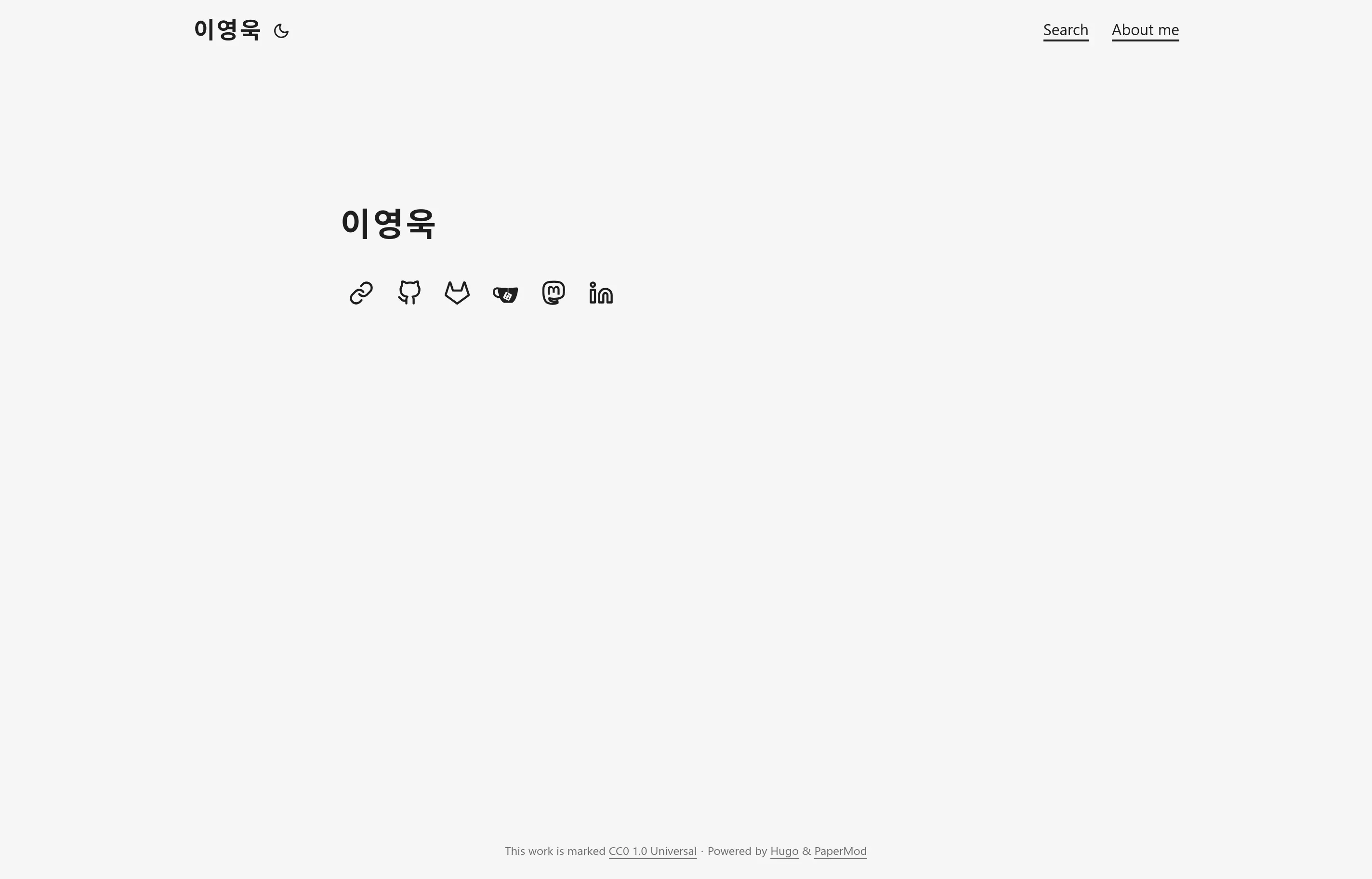
I could now see how my future website would look like.
Moving blog posts
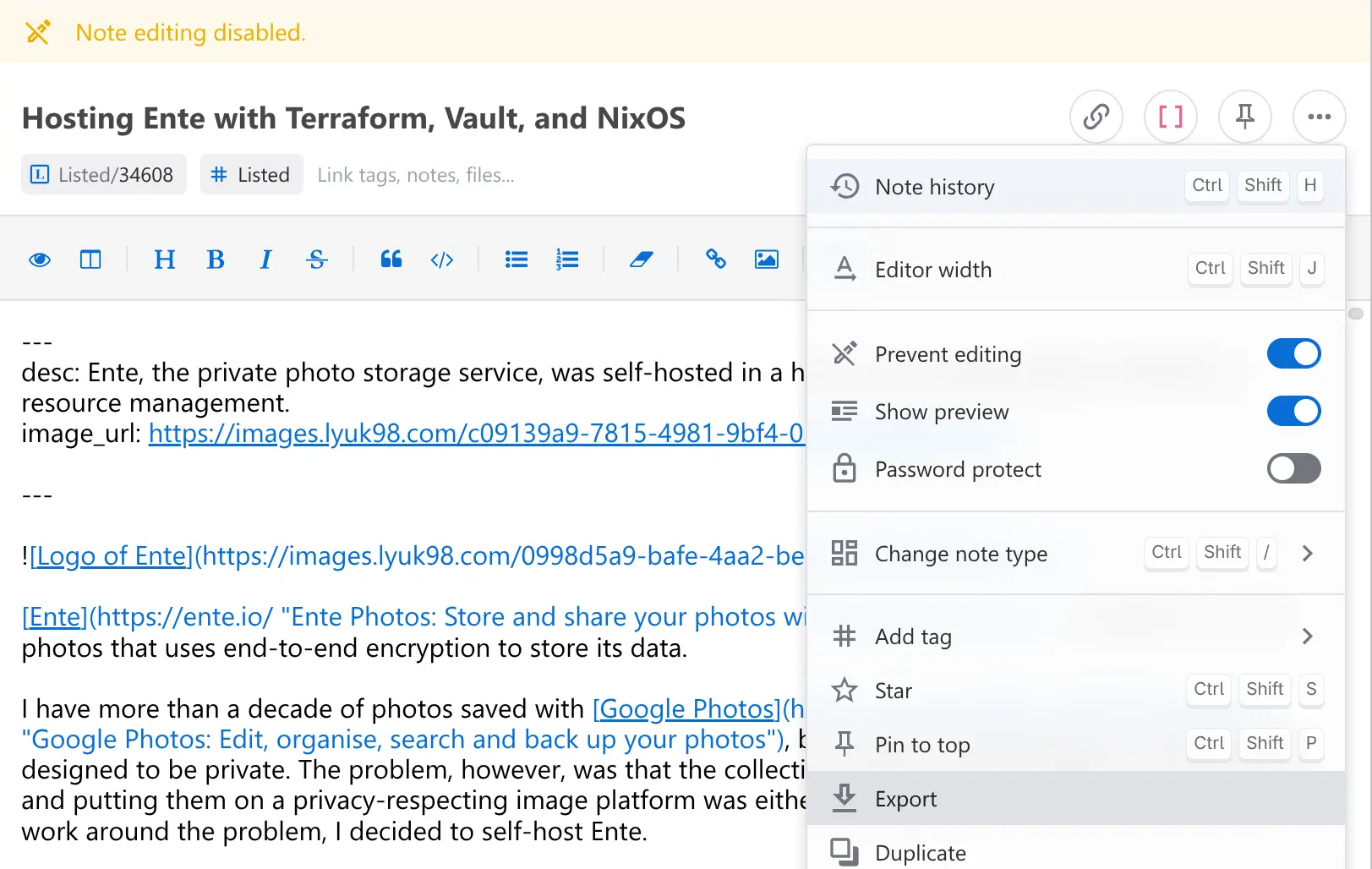
It was time to put my posts into the new home. First, I exported them from the Standard Notes client.
They were then copied to a directory for my blog posts, at content/en/blog.
[lyuk98@framework:~/pages]$ ls content/en/blog/
'Building a homelab (#1) - Creating a Kubernetes cluster with Talos Linux.md'
'Building a project (#1) - Learning about OpenStack.md'
'Building a project (#2) - Preparing a server.md'
'Building a project (#3) - Attempting to run Kubernetes and OpenStack.md'
'Building obscure packages with Nix.md'
'Getting started with Listed.md'
'Hosting Ente with Terraform, Vault, and NixOS.md'
"Improving Listed's code legibility in dark theme.md"
'Self-hosting PeerTube with Tailscale.md'
'Switching from Arch Linux to NixOS.md'
'Using GPT fdisk to recover corrupted partition table.md'
'Using Zrythm for audio production.md'
'Using custom domain with Listed.md'
Their front matter was subsequently edited to match Hugo’s specification. date properties were set to their publication dates, title to their titles (obviously), and description to what used to be desc properties. For some posts with # in their titles, I also manually added slug; it was due to problems with Codeberg Pages, where accessing affected posts throws a 404 error.
---
date: '2025-11-05'
title: Building a project (#2) - Preparing a server
description: As an effort to host OpenStack, I prepared a device to run the service with.
slug: building-a-project-2-preparing-a-server
---
Setting up Codeberg and Codeberg Pages
Looking at Codeberg Pages, there were three ways to deploy my website:
- legacy method
- new method without CI
- new method with CI
However, the “legacy method” was the only option I could choose, since others currently do not support custom domains.
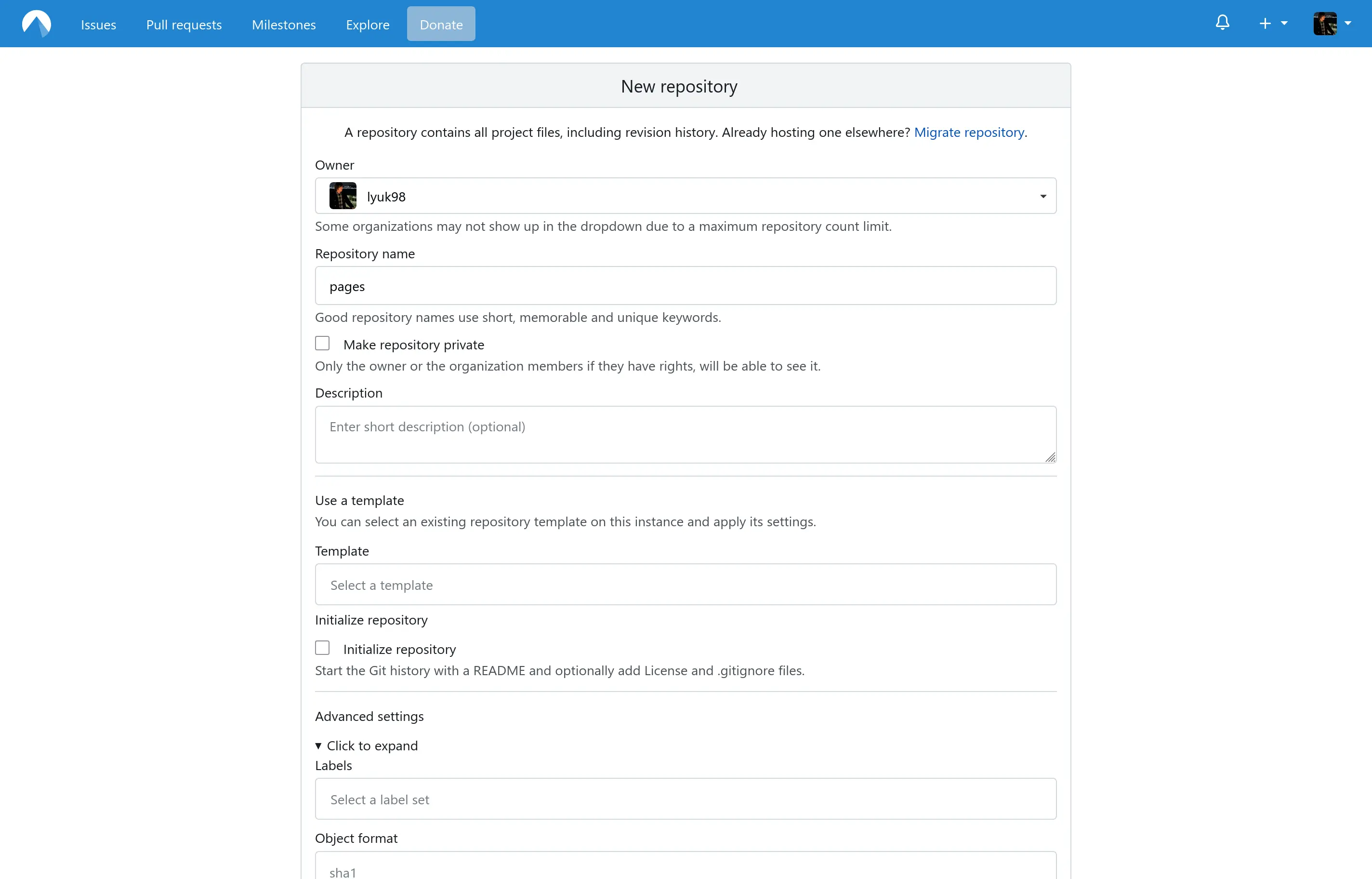
To start, I first created a repository named pages.
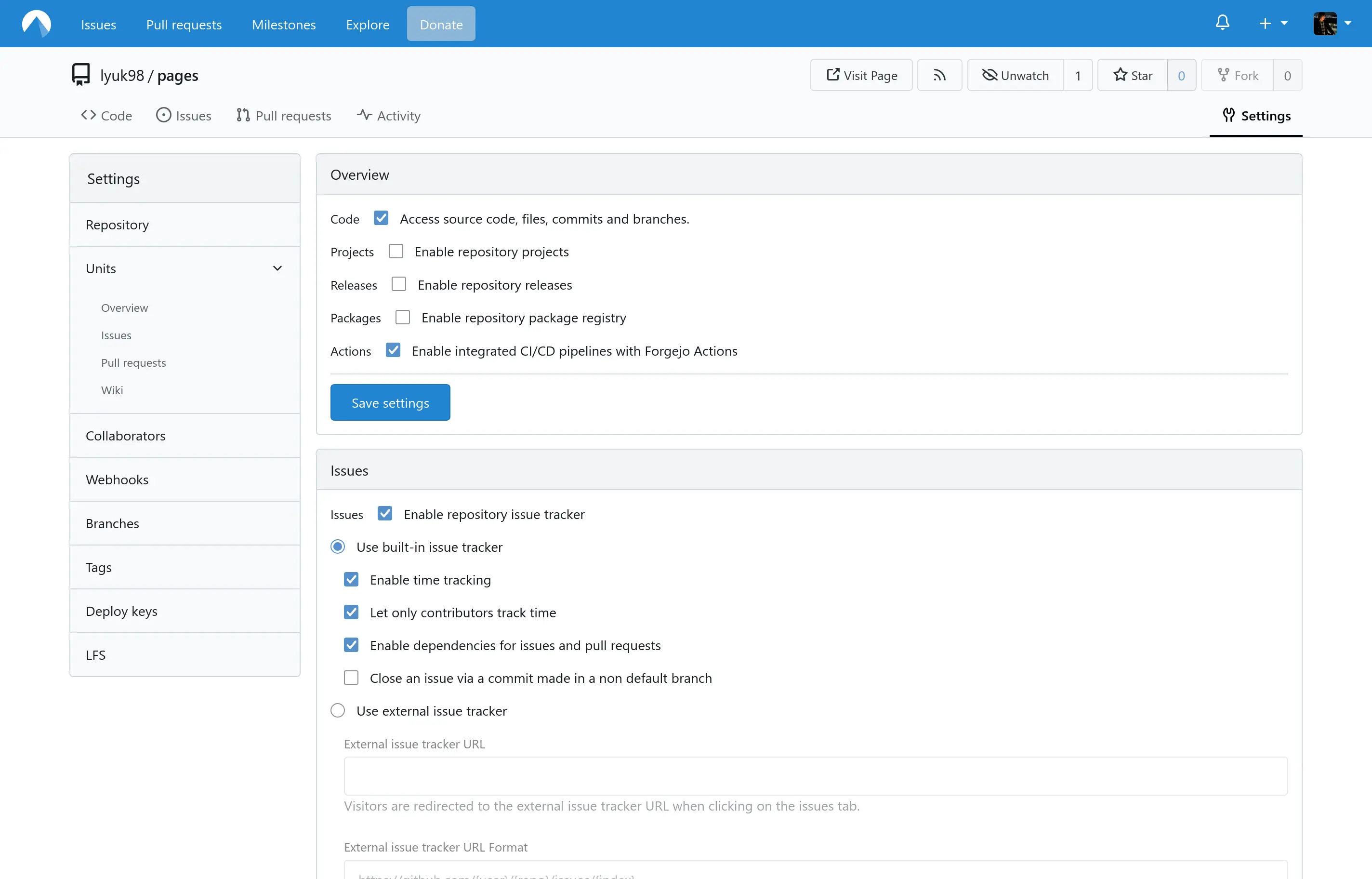
I then headed to settings and enabled Forgejo Actions for the repository.
.domains and _redirects
I did not want to break existing links that were created by Listed. To keep them working even after the migration, I tried to find a way to redirect requests.
Hugo supports aliases, redirecting requests on its own, but they recommended doing so at the server level for improved efficiency.
By default, Hugo handles aliases by creating individual HTML files for each alias path. These files contain a
meta http-equiv="refresh"tag to redirect the visitor via the browser.While functional, generating a single
_redirectsfile allows your hosting provider to handle redirects at the server level. This is more efficient than client-side redirection and improves performance by eliminating the need to load a middle-man HTML page.
Codeberg Pages allow setting up one, so I wrote _redirects containing redirect rules.
# Redirect from previously used URLs in the Listed blogging platform
/60208/getting-started-with-listed /blog/2025/03/getting-started-with-listed/ 301
/60219/building-a-project-1-learning-about-openstack /blog/2025/03/building-a-project-1-learning-about-openstack/ 301
/60610/self-hosting-peertube-with-tailscale /blog/2025/03/self-hosting-peertube-with-tailscale/ 301
/61071/using-gpt-fdisk-to-recover-corrupted-partition-table /blog/2025/04/using-gpt-fdisk-to-recover-corrupted-partition-table/ 301
/61351/using-custom-domain-with-listed /blog/2025/04/using-custom-domain-with-listed/ 301
/62055/switching-from-arch-linux-to-nixos /blog/2025/05/switching-from-arch-linux-to-nixos/ 301
/65671/hosting-ente-with-terraform-vault-and-nixos /blog/2025/09/hosting-ente-with-terraform-vault-and-nixos/ 301
/66674/building-obscure-packages-with-nix /blog/2025/10/building-obscure-packages-with-nix/ 301
/66893/building-a-project-2-preparing-a-server /blog/2025/11/building-a-project-2-preparing-a-server/ 301
/67660/building-a-project-3-attempting-to-run-kubernetes-and-openstack /blog/2025/12/building-a-project-3-attempting-to-run-kubernetes-and-openstack/ 301
/67775/improving-listed-s-code-legibility-in-dark-theme /blog/2025/12/improving-listeds-code-legibility-in-dark-theme/ 301
/68518/using-zrythm-for-audio-production /blog/2025/12/using-zrythm-for-audio-production/ 301
/70549/building-a-homelab-1-creating-a-kubernetes-cluster-with-talos-linux /blog/2026/02/building-a-homelab-1-creating-a-kubernetes-cluster-with-talos-linux/ 301
Next up was .domains, but this one was simple; I just had to add domains I want to link my pages to.
lyuk98.com
www.lyuk98.com
Any domain from the second line simply redirects to the first one. It was unfortunate that HTTP 307 Temporary Redirect response was used instead of 301 Moved Permanently, but I could not find a way to change the status code for now.
[lyuk98@framework:~]$ curl --head https://www.lyuk98.com/
HTTP/2 307
allow: GET, HEAD, OPTIONS
cache-control: public, max-age=600
content-type: text/html; charset=utf-8
location: https://lyuk98.com/
referrer-policy: strict-origin-when-cross-origin
server: pages-server
date: Wed, 18 Mar 2026 08:54:35 GMT
Writing the workflow
I started from an example workflow from a page I came across. However, I had to make some adjustments.
The guide uses an image named hugomods/hugo:exts-0.147.9. It seemed pretty dated, so I went to its Docker Hub page to check for newer versions. However, newest exts images were still not recent enough, at v0.154.5 (possibly due to build errors).
Fortunately, after a while of searching, I found an official GitHub Package, which was set as a container image for the Codeberg runner.
jobs:
  build:
    # Use lazy Codeberg runner for lightweight tasks
    runs-on: codeberg-tiny-lazy
    container:
      # Pin version of Hugo used for building
      image: ghcr.io/gohugoio/hugo:v0.158.0
The workflow would first upload generated static files, which would then be downloaded by the deploy job. A problem with this, however, was that I needed a few more files to be present.
I added another step (after running hugo) to copy the necessary files. When it was done, I included an option include-hidden-files to make sure .domains is included in the artifact.
      - name: Generate static files with Hugo
        env:
          # For maximum backward compatibility with Hugo modules
          HUGO_ENVIRONMENT: production
          HUGO_ENV: production
        run: |
          hugo \
            --gc \
            --minify
      - name: Copy files for Codeberg Pages
        run: |
          cp _redirects public/_redirects
          cp .domains public/.domains
          cp LICENSE public/LICENSE
      - name: Upload generated files
        uses: https://code.forgejo.org/actions/upload-artifact@v3
        with:
          name: Generated files
          path: public/
          include-hidden-files: true
The rest was pretty much the same. The deploy job would download the artifact and push to the pages branch with newly generated static contents.
The remote was added to the Git directory afterwards.
[lyuk98@framework:~/pages]$ git remote add origin ssh://git@codeberg.org/lyuk98/pages.git
Before running git push, though, I had a few more things to do.
Deploying the service
It was finally time to say goodbye to Listed deploy the website. Up until now, I could have backed out with no consequences; however, there was no going back after taking the following steps.
After going to my Listed blog’s settings, I disabled the custom domain integration. I knew this was going to happen, but it was nevertheless hard to press that button.

When it was done, I went to my DNS provider, Cloudflare. From there, I added the following records to my domain:
| Type | Name | Data | Proxy status |
|---|---|---|---|
A | @ | 217.197.84.141 | DNS only |
AAAA | @ | 2a0a:4580:103f:c0de::2 | DNS only |
TXT | @ | pages.pages.lyuk98.codeberg.page | DNS only |
A | www | 217.197.84.141 | DNS only |
AAAA | www | 2a0a:4580:103f:c0de::2 | DNS only |
TXT | www | pages.pages.lyuk98.codeberg.page | DNS only |
I messed up in this step, in two ways:
- I initially set the records to be “Proxied”, which likely prevented proper issuance of a TLS certificate; after changing it to “DNS only” and waiting for more than 6 hours, the issue was eventually solved without any further action.
TXTrecords were initially set to justlyuk98.codeberg.page; expected value is something like[[branch.]repo.]user.codeberg.page, but I did not know omittingbranchcauses a fallback to the repository’s default branch, which ismain.
Changes made to the local directory were then finally pushed to Codeberg, where the workflow pushed the generated website to a separate pages branch.
[lyuk98@framework:~/pages]$ git push --set-upstream origin main
Mirroring the repository
I polished a few rough edges after the successful first deployment. With the new blog now operational, I decided to mirror my repository next.
There was a guide I could follow to reach my goal. Instead of creating personal access tokens, though, I chose to use SSH authentication.
For start, I created a repository at GitHub, with the same name as the one at Codeberg.
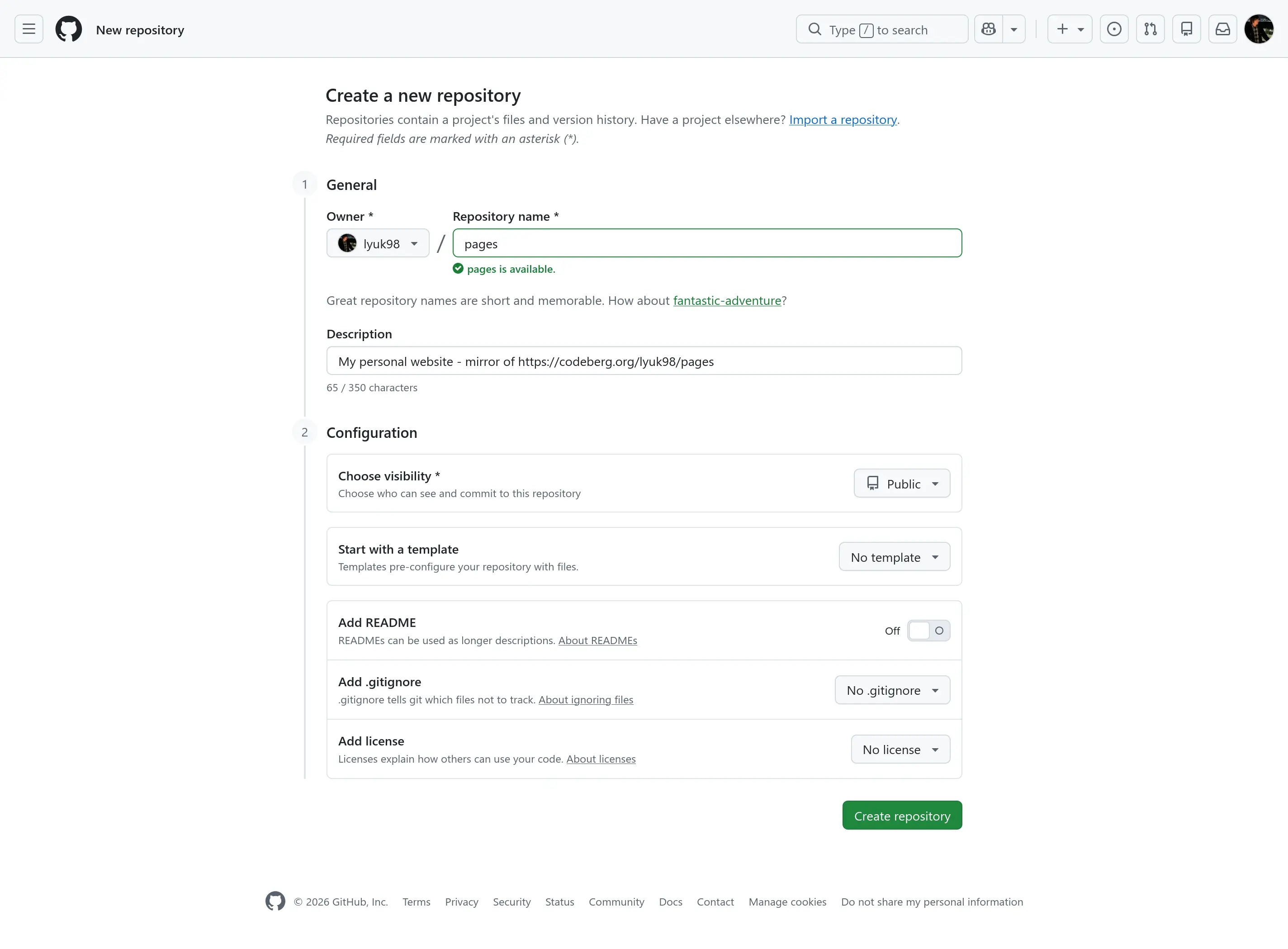
When it was done, I went to the settings of my Codeberg repository, where I set up a push mirror.
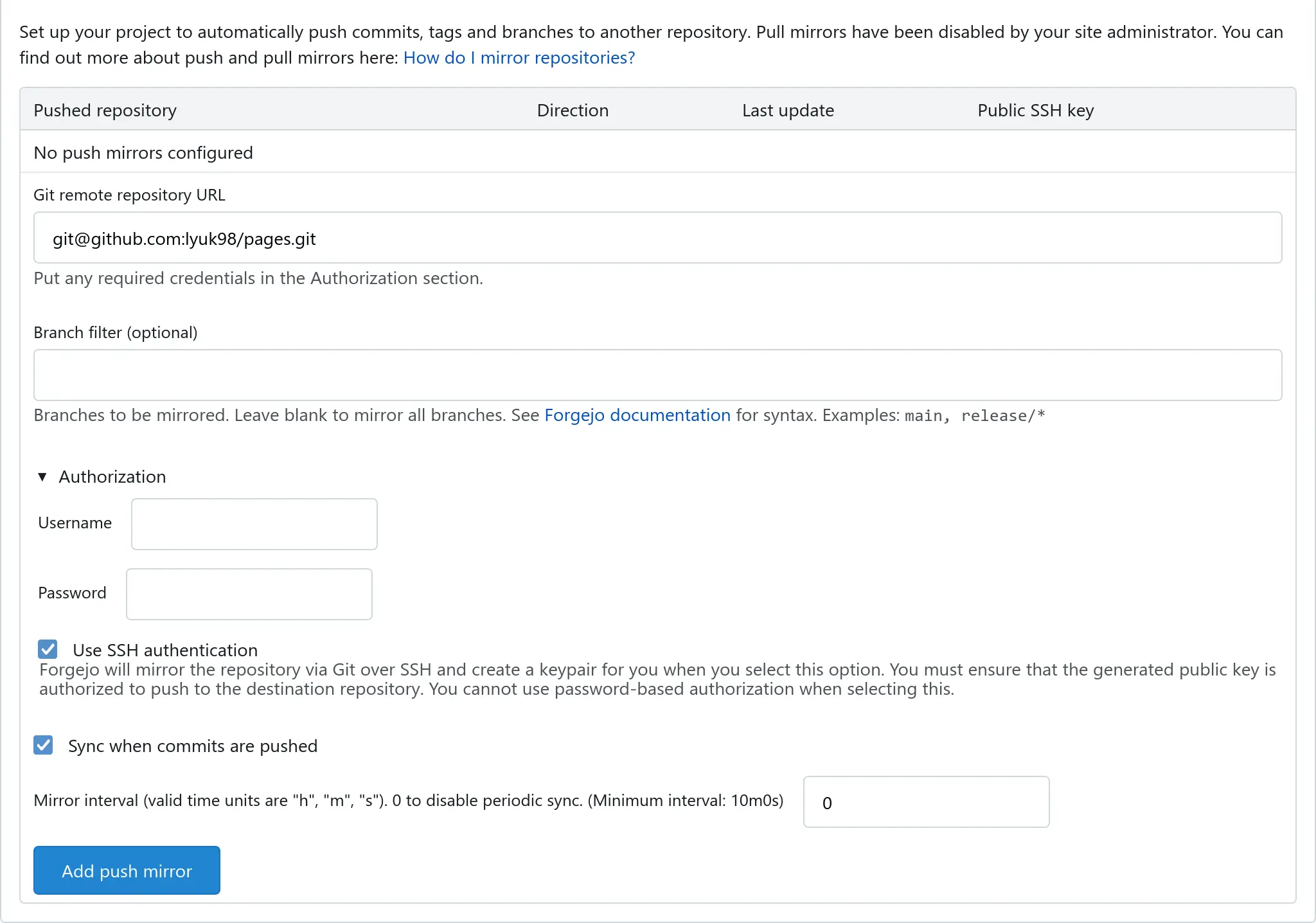
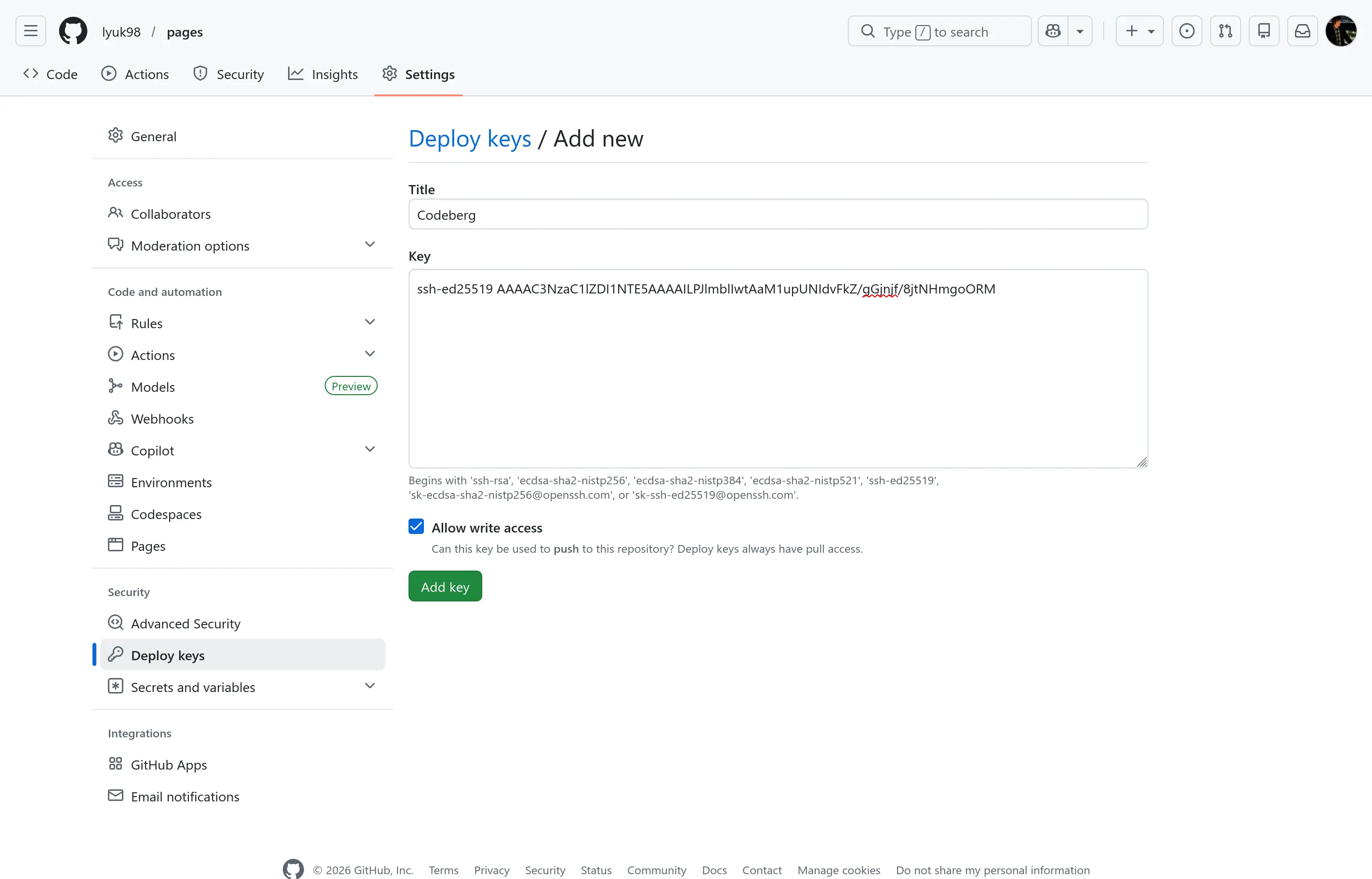
Doing so generated a public SSH key, which I added as a deploy key in my GitHub repository.
Measuring the benefits
Setting up a Jekyll site
Earlier in this post, I mentioned a possible performance improvement by using Hugo over Jekyll. I decided to see if the difference is noticeable, even if I do not have a lot of documents for the generator to build.
Running a Ruby gem (like Jekyll) in NixOS turned out to be a more involved process than I have previously imagined. However, the Nixpkgs reference manual helped me throughout the process.
First, a new site was created.
[lyuk98@framework:~]$ nix run nixpkgs#jekyll -- new myblog

[lyuk98@framework:~]$ cd myblog/
Gemfile.lock and gemset.nix were to be generated next. Before that, though, I commented out a line from Gemfile that contains http_parser.rb, as an error occurs otherwise.
[lyuk98@framework:~/myblog]$ sed \
  --in-place \
  --expression 's/gem "http_parser.rb"/# gem "http_parser.rb"/g' \
  Gemfile

[lyuk98@framework:~/myblog]$ nix run nixpkgs#bundler -- lock

[lyuk98@framework:~/myblog]$ nix run nixpkgs#bundix
A shell environment for running Jekyll was then defined. With nix-shell, I was now ready to build my site.
[lyuk98@framework:~/myblog]$ cat << EOF > shell.nix
with (import <nixpkgs> {}); let
  gems = bundlerEnv {
    name = "myblog";
    gemdir = ./.;
  };
in
mkShell {
  packages = [
    gems
    gems.wrappedRuby
  ];
}
EOF

[lyuk98@framework:~/myblog]$ nix-shell
To generate a website from my blog posts, they were first copied from the Hugo project. A Markdown document generated upon the site’s creation was then removed.
[nix-shell:~/myblog]$ cp ~/pages/content/en/blog/* ~/myblog/_posts/

[nix-shell:~/myblog]$ cp ~/pages/content/en/about-me.md ~/myblog/_posts/

[nix-shell:~/myblog]$ rm _posts/2026-03-18-welcome-to-jekyll.markdown
Date was added to the start of each document’s filename, since posts oddly did not appear without one. Furthermore, layout: post was added to each post’s front matter.
[nix-shell:~/myblog]$ cd _posts/

[nix-shell:~/myblog/_posts]$ for md in *.md; do mv "$md" "2026-03-18-$md"; done

[nix-shell:~/myblog/_posts]$ cd -

[nix-shell:~/myblog]$ for md in _posts/*.md; do \
  sed \
    --in-place \
    --expression "s/title:/layout: post\ntitle:/g" \
    "$md"; \
done
It was now time to build the whole thing. I ran jekyll build to do so.
[nix-shell:~/myblog]$ jekyll build --profile
When it was done, I was somewhat surprised by the result.
Build Process Summary:

| PHASE    |   TIME |
+----------+--------+
| RESET    | 0.0000 |
| READ     | 0.0113 |
| GENERATE | 0.0003 |
| RENDER   | 0.5104 |
| CLEANUP  | 0.0007 |
| WRITE    | 0.0017 |


Site Render Stats:

| Filename                                                           | Count |    Bytes |  Time |
+--------------------------------------------------------------------+-------+----------+-------+
| minima-2.5.2/_layouts/default.html                                 |    17 | 1256.60K | 0.033 |
| minima-2.5.2/_includes/head.html                                   |    17 |   34.47K | 0.020 |
| minima-2.5.2/_layouts/post.html                                    |    14 | 1178.08K | 0.016 |
| feed.xml                                                           |     1 | 1114.81K | 0.013 |
| minima-2.5.2/_includes/footer.html                                 |    17 |   19.77K | 0.006 |
| minima-2.5.2/_includes/header.html                                 |    17 |   16.82K | 0.005 |
| minima-2.5.2/_includes/social.html                                 |    17 |    6.64K | 0.004 |
| _posts/2026-03-18-Hosting Ente with Terraform, Vault, and NixOS.md |     1 |  113.84K | 0.002 |
| minima-2.5.2/_layouts/home.html                                    |     1 |    3.53K | 0.001 |
| minima-2.5.2/_layouts/page.html                                    |     2 |    1.18K | 0.000 |

                    done in 0.529 seconds.
 Auto-regeneration: disabled. Use --watch to enable.
It was pretty close to how much Hugo took to generate my site. To be sure, however, I ran hugo build again to see how long the Go-based site generator would take.
[lyuk98@framework:~/pages]$ ../hugo build --templateMetrics
Start building sites …
hugo v0.158.0-f41be7959a44108641f1e081adf5c4be7fc1bb63 linux/amd64 BuildDate=2026-03-16T17:42:04Z VendorInfo=gohugoio


Template Metrics:

       cumulative       average       maximum
         duration      duration      duration  count  template
       ----------      --------      --------  -----  --------
     752.364974ms   50.157664ms   97.795613ms     15  single.html
      746.99613ms   32.478092ms   93.366651ms     23  _partials/head.html
     414.504195ms   18.021921ms   87.866032ms     23  _partials/templates/schema_json.html
     286.526687ms   71.631671ms  143.170913ms      4  rss.xml
     191.161551ms   47.790387ms   94.426211ms      4  list.html
     160.054027ms  160.054027ms  160.054027ms      1  index.json
      55.725994ms      24.334µs     753.117µs   2290  _markup/render-link.html
        30.4545ms     708.244µs    5.271358ms     43  _partials/post_meta.html
      24.771099ms    1.651406ms    4.521961ms     15  _partials/toc.html
      21.563459ms   21.563459ms   21.563459ms      1  search.html
      17.617011ms     765.957µs    1.980081ms     23  _partials/templates/opengraph.html
      11.829105ms    5.914552ms     8.17769ms      2  _default/terms.html
      11.066758ms     481.163µs    2.162197ms     23  _partials/header.html
       9.148543ms      38.278µs     631.799µs    239  _markup/render-image.html
       8.640652ms    8.640652ms    8.640652ms      1  404.html
       8.296751ms     360.728µs     1.09994ms     23  _partials/_funcs/get-page-images.html
       6.729657ms     292.593µs    1.191821ms     23  _partials/templates/twitter_cards.html
       6.696737ms     446.449µs     883.798µs     15  _partials/anchored_headings.html
       5.614319ms    5.614319ms    5.614319ms      1  _partials/home_info.html
       5.392968ms    5.392968ms    5.392968ms      1  _partials/social_icons.html
       4.933541ms     822.256µs    3.426743ms      6  _partials/svg.html
       4.843961ms     124.204µs     569.818µs     39  _partials/templates/_funcs/get-page-images.html
       2.376216ms     158.414µs     474.253µs     15  _partials/post_nav_links.html
       2.031413ms     119.494µs     280.406µs     17  _partials/breadcrumbs.html
       1.666743ms      25.253µs     144.466µs     66  _partials/author.html
       1.587784ms      69.034µs     603.984µs     23  _partials/footer.html
       1.120081ms     112.008µs     780.924µs     10  _markup/render-table.html.html
        914.008µs      39.739µs     855.377µs     23  _partials/extend_head.html
        510.797µs     510.797µs     510.797µs      1  sitemap.xml
        494.178µs      21.486µs     107.575µs     23  _partials/google_analytics.html
        330.503µs      22.033µs     194.021µs     15  _partials/edit_post.html
        296.279µs      29.627µs      180.17µs     10  _markup/render-table.rss.xml
        245.244µs      24.524µs     150.219µs     10  _markup/render-table.json.json
        176.977µs       4.115µs      20.577µs     43  _partials/cover.html
         98.243µs       6.549µs      38.413µs     15  _partials/post_canonical.html
         74.928µs       4.683µs      13.435µs     16  _partials/translation_list.html
         66.122µs      33.061µs      46.554µs      2  alias.html
         11.791µs         786ns       1.905µs     15  _partials/comments.html
          5.445µs         907ns       1.618µs      6  _partials/extend_footer.html


                  │ EN
──────────────────┼────
 Pages            │ 27
 Paginator pages  │  2
 Non-page files   │  0
 Static files     │  1
 Processed images │  0
 Aliases          │  2
 Cleaned          │  0

Total in 505 ms
As expected, the difference was not something that I would notice. After running both processes a few more times, Jekyll could be seen taking 500 to 520 milliseconds during each build, while Hugo took 480 to 500 milliseconds.
However, given that…
- I have configured a custom theme on my Hugo project, and
- the Jekyll site was set up just enough to run properly…
I felt it was a somewhat unfair way to compare their performance. The Ruby-based site generator was still technically slower (by about 4%), though, and I think I made a right choice overall.
Reducing costs
Having a Productivity or Professional plan at Standard Notes was required to enable custom domain integration with Listed (and it is not possible at all now). The Productivity plan, which is what I am currently using, costs $63 per year; since the custom domain integration was pretty much the only thing that kept me from unsubscribing, I could reduce that yearly cost to zero by relying on generous cloud service providers. As a result, I think the amount that I have saved can now be spent on other priorities in my life at the moment.
But Backblaze just increased their monthly storage price!
Finishing up
The blog is now available at https://lyuk98.com/ (and https://lyuk98.codeberg.page/, but it redirects to the former anyway). The code is in my repository at Codeberg, which is mirrored to the GitHub one.
The Listed blog instance is still live at the time of writing, but I am not sure if I will want to take it down at some point in the future. If it is no longer accessible, you know why.
For now, though, I am glad that the migration turned out well.